Before integrating the PAX D135 with the Android or iOS SDK, complete the following one-time setup. These steps configure your device's environment, establish your API credentials, and register your PAX D135 with Finix.
When ordering a PAX D135, specify whether each Device is designated for Sandbox or Production. Finix provides you with the serial number assigned to each Device.
A D135 Device can be designated for either Sandbox development or Production transaction processing but not both. We recommend requesting enough devices to utilize in both your Sandbox development and Production testing.
- Your PAX D135 device is fully charged.
- iOS: iOS 18.1 or higher.
- Android: Android 8.0 (API level 26) or higher.
Charge the battery only with PAX-approved power supplies. Using others may damage the product and void the warranty.
Charging time must not exceed 24 hours. If the battery is empty, recharge it fully, then disconnect the device to avoid shortening its life.
The PAX D135 downloads its encryption keys from PAX servers during first-time configuration. This traffic uses the internet connection of the phone or tablet the D135 is paired with. If that network has a firewall, allow the following PAX hosts for the environment your Device is designated for:
| Environment | Host |
|---|---|
| Sandbox | rkilt.pax.us:33619 |
| Production | rki.pax.us:33519 |
The SDK supports the use of either ROLE_PARTNER or ROLE_MERCHANT credentials. If you would like to scope your device to a single Merchant, it is recommended to use ROLE_MERCHANT credentials. If you plan to use the Device across multiple merchants, you should use ROLE_PARTNER credentials.
Split Transactions require the use of ROLE_PARTNER credentials.
Create a User with role: ROLE_MERCHANT.
curl -i -X POST \
  -u USfdccsr1Z5iVbXDyYt7hjZZ:313636f3-fac2-45a7-bff7-a334b93e7bda \
  https://finix.sandbox-payments-api.com/users \
  -H 'Content-Type: application/json' \
  -H 'Finix-Version: 2022-02-01' \
  -d '{
    "role": "ROLE_MERCHANT",
    "identity_id": "ID6YeRojM2ppNkPt4mP8ExNH"
  }'
You can use the credentials across multiple devices as long as the devices are associated with the same Merchant.
To create ROLE_PARTNER credentials:
- Log in to the Finix Dashboard.
- Select the environment for which you would like to create the API credentials (Sandbox or Live).
- In the bottom left-hand corner, click Developer.
- From the API Keys tab, click Create API Key.
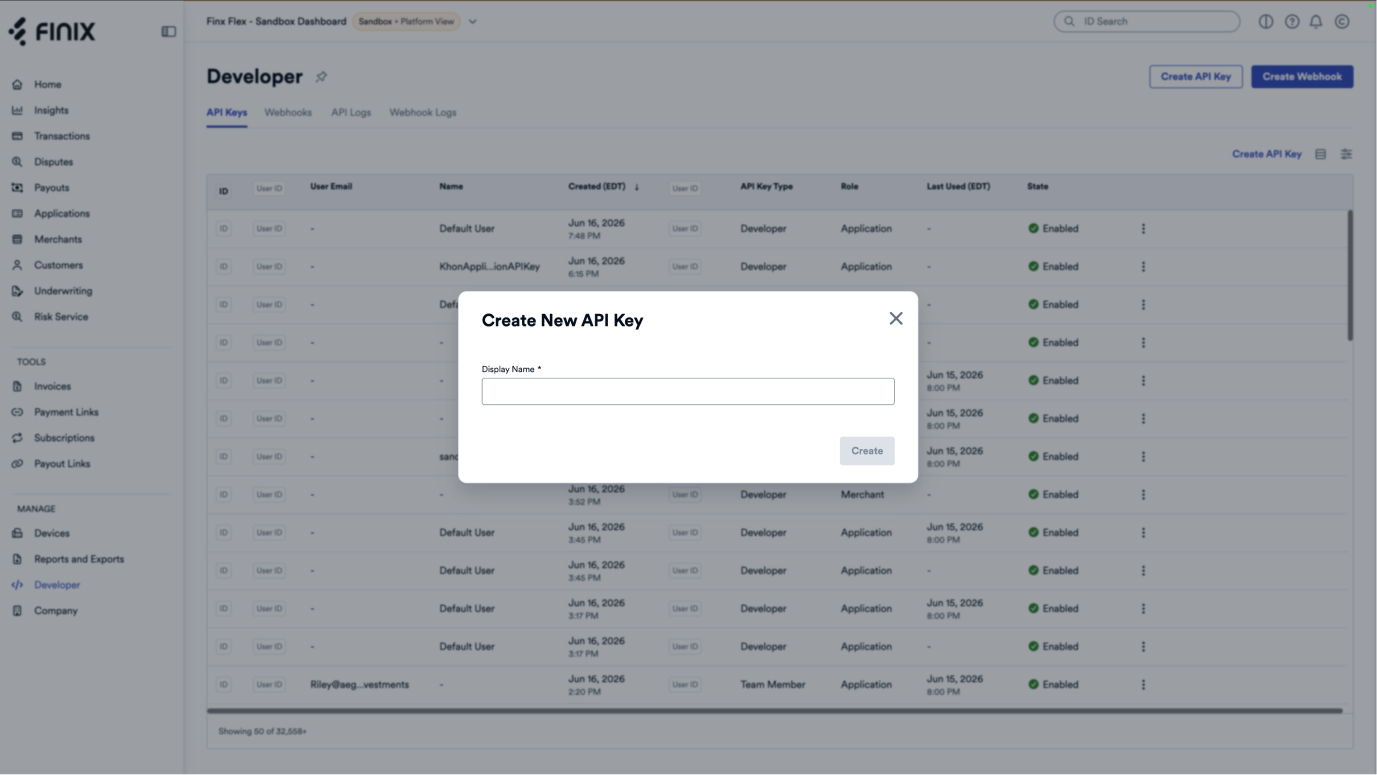
Creating a Device can be done either using the Finix Dashboard or the Finix API. Below are the steps for creating a Device using the API.
Create a Device under the Merchant provisioned to process in-person payments. Include the model of the payment terminal you'll be using to process cards.
Choose the payment terminal that best fits your business needs. View our available devices to compare options.
curl -i -X POST \
  -u USfdccsr1Z5iVbXDyYt7hjZZ:313636f3-fac2-45a7-bff7-a334b93e7bda \
  https://finix.sandbox-payments-api.com/merchants/MUwfZPNW3r4EqLMzwgr6txw4/devices \
  -H 'Content-Type: application/json' \
  -d '{
    "description": "Cashier Three",
    "model": "PAX_D135",
    "name": "My PAX_D135 Finix Device",
    "serial_number": "19046260947"
}'{
"id": "DVxcL2fiBdt9frYCKAbZikZK",
"created_at": "2025-05-21T19:01:32.000581Z",
"updated_at": "2025-05-21T19:01:32.000581Z",
"configuration_details": {
"allow_debit": true,
"check_for_duplicate_transactions": true,
"prompt_amount_confirmation": true,
"prompt_manual_entry": false,
"signature_threshold_amount": 10000,
"bypass_device_on_capture": true,
"prompt_receipt_confirmation": true,
"display_tip_on_receipt": false,
"prompt_tip_on_screen": false,
"allow_standalone_authorizations": false,
"allow_standalone_sales": false,
"allow_standalone_refunds": false,
"tipping_details": {
"percent_tipping_threshold": 0,
"percent_options": [18, 20, 22],
"fixed_options": [100, 150, 200]
},
"idle_message": null,
"idle_image_file_id": null,
"automatic_receipt_delivery_methods": null,
"available_receipt_methods": null,
"prompt_for_signature": "NEVER",
"surcharge_basis_points": null
},
"description": "Cashier Three",
"enabled": false,
"idle_message": null,
"merchant": "MU7noQ1wdgdAeAfymw2rfBMq",
"model": "PAX_D135",
"name": "My PAX_D135 Finix Device",
"serial_number": "19046260947",
"tags": {},
"_links": {
"self": {
"href": "https://finix.sandbox-payments-api.com/devices/DVxcL2fiBdt9frYCKAbZikZK"
},
"merchant": {
"href": "https://finix.sandbox-payments-api.com/merchants/MU7noQ1wdgdAeAfymw2rfBMq"
},
"transfers": {
"href": "https://finix.sandbox-payments-api.com/transfers"
},
"authorizations": {
"href": "https://finix.sandbox-payments-api.com/authorizations"
}
}
}