Finix supports both Online Payments and In-Person Payments. This quickstart provides details on how your business can accept a payment with Finix.
Accept online payments with Finix's complete solution, whether you're building a custom checkout experience or need a quick payment solution.
- Flexible integrations: Build custom payment flows with our APIs, or get started with our low-code / no-code solutions
- Multiple payment methods: Accept credit cards, debit cards, bank accounts, digital wallets, and more.
- Security first: Protect sensitive payment data with our PCI-compliant tokenization system.
To see an example of our Tokenization Forms and Hosted Checkout, you can visit our sample store and related GitHub Project.
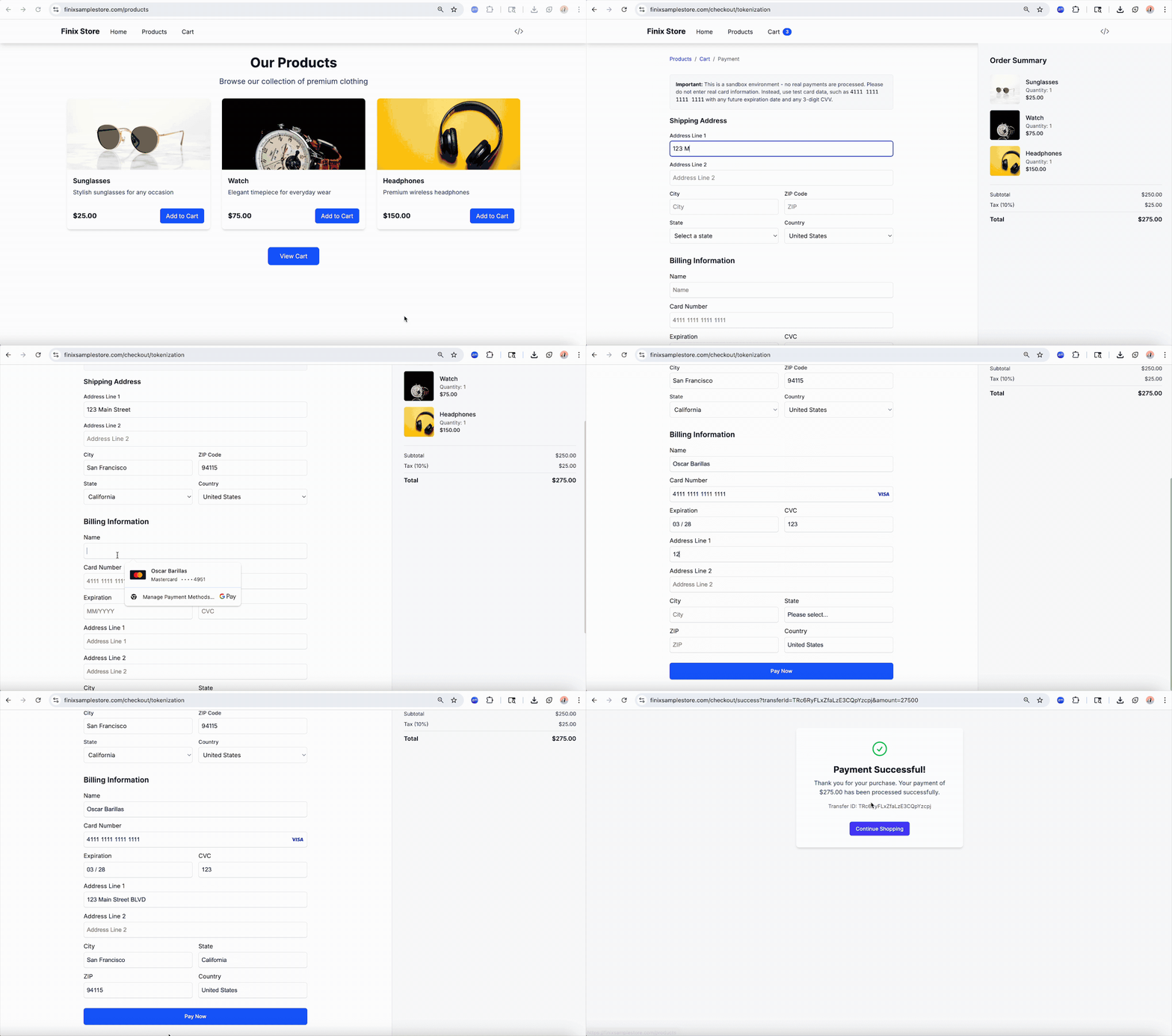
Our Tokenization Forms allow you to build a custom checkout page you own and control. This option is great if you want maximum customizability.
With your API Key and Merchant ID, you can start processing payments.
To process a payment, you need to create an Identity that represents your buyer. You won’t need to capture the same amount of information from your buyer. So long as you don’t pass a identity#business_type field all the other fields are optional.
We recommend at least collecting the buyer’s name and email to help with accounting, reconciliation, and chargebacks.
Do not pass the business_type field when creating an Identity for a buyer. Including business_type configures our API to treat the created Identity as a seller.
- Sandbox serverhttps://finix.sandbox-payments-api.com/identities
curl -i -X POST \
  -u USfdccsr1Z5iVbXDyYt7hjZZ:313636f3-fac2-45a7-bff7-a334b93e7bda \
  https://finix.sandbox-payments-api.com/identities \
  -H 'Content-Type: application/json' \
  -H 'Finix-Version: 2022-02-01' \
  -d '{
    "entity": {
      "email": "johnsmithbuyer@gmail.com",
      "first_name": "John",
      "last_name": "Smith",
      "personal_address": {
        "city": "San Mateo",
        "country": "USA",
        "line1": "741 Douglass St",
        "line2": "Apartment 7",
        "postal_code": "94114",
        "region": "CA"
      },
      "phone": "7147148784"
    },
    "identity_roles": [
      "BUYER"
    ],
    "type": "PERSONAL"
  }'
A successful response returns the Identity you'll use in the next step.
{
  "id": "IDk3Wrrvcv67f4KShZtoENR2",
  "created_at": "2026-09-03T17:40:42.71Z",
  "updated_at": "2026-09-03T17:40:42.71Z",
  "application": "APc9vhYcPsRuTSpKD9KpMtPe",
  "entity": {
    "ach_max_transaction_amount": 0,
    "amex_mid": null,
    "annual_card_volume": 0,
    "business_address": null,
    "business_name": null,
    "business_phone": null,
    "business_tax_id_fingerprint": null,
    "business_tax_id_provided": false,
    "business_type": null,
    "default_statement_descriptor": null,
    "discover_mid": null,
    "dob": null,
    "doing_business_as": null,
    "email": "johnsmithbuyer@gmail.com",
    "first_name": "John",
    "has_accepted_credit_cards_previously": false,
    "incorporation_date": null,
    "last_name": "Smith",
    "max_transaction_amount": 0,
    "mcc": null,
    "ownership_type": null,
    "personal_address": {
      "line1": "741 Douglass St",
      "line2": "Apartment 7",
      "city": "San Mateo",
      "region": "CA",
      "postal_code": "94114",
      "country": "USA"
    },
    "phone": "7147148784",
    "principal_percentage_ownership": null,
    "short_business_name": null,
    "tax_authority": null,
    "tax_id_fingerprint": null,
    "tax_id_provided": false,
    "title": null,
    "url": null
  },
  "identity_roles": [
    "BUYER"
  ],
  "tags": {},
  "type": "PERSONAL",
  "_links": {
    "self": {
      "href": "https://finix.sandbox-payments-api.com/identities/IDk3Wrrvcv67f4KShZtoENR2"
    },
    "verifications": {
      "href": "https://finix.sandbox-payments-api.com/identities/IDk3Wrrvcv67f4KShZtoENR2/verifications"
    },
    "merchants": {
      "href": "https://finix.sandbox-payments-api.com/identities/IDk3Wrrvcv67f4KShZtoENR2/merchants"
    },
    "settlements": {
      "href": "https://finix.sandbox-payments-api.com/identities/IDk3Wrrvcv67f4KShZtoENR2/settlements"
    },
    "authorizations": {
      "href": "https://finix.sandbox-payments-api.com/identities/IDk3Wrrvcv67f4KShZtoENR2/authorizations"
    },
    "transfers": {
      "href": "https://finix.sandbox-payments-api.com/identities/IDk3Wrrvcv67f4KShZtoENR2/transfers"
    },
    "payment_instruments": {
      "href": "https://finix.sandbox-payments-api.com/identities/IDk3Wrrvcv67f4KShZtoENR2/payment_instruments"
    },
    "associated_identities": {
      "href": "https://finix.sandbox-payments-api.com/identities/IDk3Wrrvcv67f4KShZtoENR2/associated_identities"
    },
    "disputes": {
      "href": "https://finix.sandbox-payments-api.com/identities/IDk3Wrrvcv67f4KShZtoENR2/disputes"
    },
    "application": {
      "href": "https://finix.sandbox-payments-api.com/applications/APc9vhYcPsRuTSpKD9KpMtPe"
    }
  }
}Now that you have an Identity resource representing your buyer, you need to create a Payment Instrument for your buyer to represent the credit card you’ll be debiting (i.e. charging).
You’ll also need to include your buyer’s Identity#id from the previous request to link the Payment Instrument that's created with your buyer's details.
Please note that creating Payment Instruments and passing payment details (account number, card number, etc.) directly via the API should only be done for testing purposes. You must use the Tokenization Forms or mobile tokenization (see Android or iOS tokenization) to accept payment details and remain out of PCI scope.
- Sandbox serverhttps://finix.sandbox-payments-api.com/payment_instruments
curl -i -X POST \
  -u USfdccsr1Z5iVbXDyYt7hjZZ:313636f3-fac2-45a7-bff7-a334b93e7bda \
  https://finix.sandbox-payments-api.com/payment_instruments \
  -H 'Content-Type: application/json' \
  -H 'Finix-Version: 2022-02-01' \
  -d '{
    "address": {
      "city": "San Francisco",
      "country": "USA",
      "line1": "900 Metro Center Blv",
      "postal_code": "94404",
      "region": "CA"
    },
    "expiration_month": 12,
    "expiration_year": 2029,
    "identity": "IDmj1yA97RS4rMjiQgvK3Vio",
    "name": "John Smith",
    "number": "5200828282828210",
    "security_code": "022",
    "type": "PAYMENT_CARD"
  }'
A successful response returns the newly created Payment Instrument you'll use to process the buyer's payment.
{
  "id": "PI7xmKFaGzFyqqs5GCADifAv",
  "created_at": "2026-09-03T17:40:58.19Z",
  "updated_at": "2026-09-03T17:40:58.19Z",
  "application": "APc9vhYcPsRuTSpKD9KpMtPe",
  "created_via": "API",
  "currency": "USD",
  "disabled_code": null,
  "disabled_message": null,
  "enabled": true,
  "fingerprint": "FPRiCenDk2SoRng7WjQTr7RJY",
  "identity": "IDmj1yA97RS4rMjiQgvK3Vio",
  "instrument_type": "PAYMENT_CARD",
  "account_updater_enabled": false,
  "address": {
    "line1": "900 Metro Center Blv",
    "line2": null,
    "city": "San Francisco",
    "region": "CA",
    "postal_code": "94404",
    "country": "USA"
  },
  "address_verification": "UNKNOWN",
  "bin": "520082",
  "brand": "MASTERCARD",
  "card_type": "DEBIT",
  "expiration_month": 12,
  "expiration_year": 2029,
  "issuer_country": "USA",
  "last_four": "8210",
  "name": "John Smith",
  "network_token_enabled": false,
  "network_token_state": "NOT_ENABLED",
  "security_code_verification": "UNKNOWN",
  "tags": {},
  "third_party": null,
  "third_party_token": null,
  "type": "PAYMENT_CARD",
  "_links": {
    "self": {
      "href": "https://finix.sandbox-payments-api.com/payment_instruments/PI7xmKFaGzFyqqs5GCADifAv"
    },
    "authorizations": {
      "href": "https://finix.sandbox-payments-api.com/payment_instruments/PI7xmKFaGzFyqqs5GCADifAv/authorizations"
    },
    "transfers": {
      "href": "https://finix.sandbox-payments-api.com/payment_instruments/PI7xmKFaGzFyqqs5GCADifAv/transfers"
    },
    "verifications": {
      "href": "https://finix.sandbox-payments-api.com/payment_instruments/PI7xmKFaGzFyqqs5GCADifAv/verifications"
    },
    "application": {
      "href": "https://finix.sandbox-payments-api.com/applications/APc9vhYcPsRuTSpKD9KpMtPe"
    },
    "identity": {
      "href": "https://finix.sandbox-payments-api.com/identities/IDmj1yA97RS4rMjiQgvK3Vio"
    },
    "updates": {
      "href": "https://finix.sandbox-payments-api.com/payment_instruments/PI7xmKFaGzFyqqs5GCADifAv/updates"
    }
  }
}At this point, we've tokenized a buyer's payment details. We can now create a payment.
To make a payment, you need to create a Transfer. Include the buyer’s Payment Instrument#id as the source field and the your Merchant#id in the merchant field.
- If you are a Direct Merchant, you will be provided a
merchant_idto use. You can find this in your Developer section on the Dashboard. If you need help finding this ID, please contact our support team or your Finix point of contact. - If you are a Platform, you will need to onboard each of your sellers. Each seller will be provided a unique
merchant_id.
- Sandbox serverhttps://finix.sandbox-payments-api.com/transfers
curl -i -X POST \
  -u USfdccsr1Z5iVbXDyYt7hjZZ:313636f3-fac2-45a7-bff7-a334b93e7bda \
  https://finix.sandbox-payments-api.com/transfers \
  -H 'Content-Type: application/json' \
  -H 'Finix-Version: 2022-02-01' \
  -d '{
    "amount": 5000,
    "currency": "CAD",
    "merchant": "string",
    "source": "PIxxxxxxxxxxxxxxxxxx"
  }'
A successful request returns a 201 Created status, with the response body containing a Transfer resource that includes:
type- eitherDEBITorCREDIT, depending on the payment instrumentstate- set toSUCCEEDED
{
  "id": "TR8fezr4xCMFJvH5rzCqrUkF",
  "created_at": "2025-10-24T17:38:19.09Z",
  "updated_at": "2025-10-24T17:38:19.09Z",
  "additional_buyer_charges": {
    "convenience_amount": 150,
    "surcharge_amount": 0,
    "rent_surcharge_amount": 0
  },
  "additional_healthcare_data": null,
  "additional_purchase_data": {
    "customer_reference_number": "321xyz",
    "customs_duty_amount": 10,
    "destination_country_code": null,
    "destination_postal_code": null,
    "discount_amount": 100,
    "invoice_reference_number": null,
    "order_date": null,
    "sales_tax": null,
    "sales_tax_finix_generated": 200,
    "ship_from_postal_code": null,
    "shipping_amount": 100,
    "tax_exempt": false,
    "item_data": [
      {
        "cost_per_unit": 500,
        "item_description": "printing paper",
        "item_discount_amount": 100,
        "merchant_product_code": "1149611",
        "quantity": 1,
        "amount_excluding_sales_tax": 400,
        "amount_including_sales_tax": 500,
        "unit_of_measure": "BX",
        "commodity_code": "175-62-20",
        "sales_tax_amount": 100,
        "sales_tax_rate": 0.25
      },
      {
        "cost_per_unit": 500,
        "item_description": "printing ink",
        "item_discount_amount": 0,
        "merchant_product_code": "2149612",
        "quantity": 1,
        "amount_excluding_sales_tax": 400,
        "amount_including_sales_tax": 500,
        "unit_of_measure": "CTN",
        "commodity_code": "207-72-54",
        "sales_tax_amount": 100,
        "sales_tax_rate": 0.25
      }
    ]
  },
  "address_verification": "POSTAL_CODE_AND_STREET_MATCH",
  "amount": 1000,
  "amount_requested": 1000,
  "application": "APc9vhYcPsRuTSpKD9KpMtPe",
  "currency": "USD",
  "created_via": "UNKNOWN",
  "destination": null,
  "externally_funded": "UNKNOWN",
  "failure_code": null,
  "failure_message": null,
  "fee": 0,
  "fee_profile": "FP9F2KEnY4wt1XjFvhLBJVjb",
  "idempotency_id": "1234567890",
  "ip_address_details": null,
  "merchant": "MUe17jKSrfPetoeiJQzzjmA2",
  "merchant_identity": "ID6NvZy42D7PChZL8GKKD87F",
  "messages": [],
  "network_details": {
    "brand": "VISA",
    "authorization_code": "252819",
    "acquirer_reference_number": null
  },
  "operation_key": "CARD_NOT_PRESENT_SALE",
  "parent_transfer": null,
  "parent_transfer_trace_id": null,
  "raw": null,
  "ready_to_settle_at": null,
  "receipt_last_printed_at": null,
  "security_code_verification": "MATCHED",
  "source": "PI6iQcTtJNCS8GZAVKYi5Ueb",
  "split_transfers": [
    "split_transfer_8fv2kE5eWtCvru1NG5gyRL",
    "split_transfer_8fvi9GJdhMbpWWJwKkHzct"
  ],
  "state": "SUCCEEDED",
  "statement_descriptor": "FLX*FLEX GYM",
  "subtype": "API",
  "supplemental_fee": null,
  "tags": {
    "tip": "50"
  },
  "third_party_details": {
    "external_trace_id": "7249618074176301904267",
    "type": "CYBERSOURCE"
  },
  "tip_amount": null,
  "trace_id": "0db5b7cf-6fe3-4508-ac52-15b26b9b5e0a",
  "type": "DEBIT",
  "_links": {
    "application": {
      "href": "https://finix.sandbox-payments-api.com/applications/APc9vhYcPsRuTSpKD9KpMtPe"
    },
    "self": {
      "href": "https://finix.sandbox-payments-api.com/transfers/TR8fezr4xCMFJvH5rzCqrUkF"
    },
    "merchant_identity": {
      "href": "https://finix.sandbox-payments-api.com/identities/ID6NvZy42D7PChZL8GKKD87F"
    },
    "payment_instruments": {
      "href": "https://finix.sandbox-payments-api.com/transfers/TR8fezr4xCMFJvH5rzCqrUkF/payment_instruments"
    },
    "reversals": {
      "href": "https://finix.sandbox-payments-api.com/transfers/TR8fezr4xCMFJvH5rzCqrUkF/reversals"
    },
    "fees": {
      "href": "https://finix.sandbox-payments-api.com/fees?linked_to=TR8fezr4xCMFJvH5rzCqrUkF"
    },
    "disputes": {
      "href": "https://finix.sandbox-payments-api.com/transfers/TR8fezr4xCMFJvH5rzCqrUkF/disputes"
    },
    "source": {
      "href": "https://finix.sandbox-payments-api.com/payment_instruments/PI6iQcTtJNCS8GZAVKYi5Ueb"
    },
    "fee_profile": {
      "href": "https://finix.sandbox-payments-api.com/fee_profiles/FP9F2KEnY4wt1XjFvhLBJVjb"
    }
  }
}
The above response means the buyer was successfully charged and the funds will soon be ready to pay out. Finix creates a Settlement resource which maps transactions and fees to calculate your payout. Read Payouts for more details on how to manage and reconcile payouts.
Alternatively, you can create an Authorization to capture the same Authorization in two API calls. This is useful when you want to verify the payment details and capture a specific amount at a later date. For more details, see Creating and Capturing an Authorization.
We recommend including an idempotency_id to ensure that each request is processed only once. For more information, see Idempotent Requests.
Accept in-person payments with Finix’s flexible, platform-ready solution—built for custom POS flows or turnkey hardware experiences.
- Flexible integrations - Power your POS with our APIs or launch fast with our Standalone Terminals.
- Modern payment methods - Accept chip, tap, swipe, mobile wallets, and contactless payments across supported devices.
- Security first: Protect sensitive payment data with our PCI-compliant tokenization system.
To get started with our In-Person Payments, select one of the links below.
Select Your Device
Learn about the payment terminals available for In-Person Payments integrations.
Building your Integration
Learn about Finix's POS and mobile in-person payments integrations.
Standalone Terminals
Learn about Finix's Standalone Terminals.
Finix supports several payment features to let you customize your payments integration:
- Use authorizations and captures to create temporary holds before capturing full amounts later.
- Enable buyer charges to collect additional fees, such as convenience or service fees.
- Split Transactions across different approved merchants.
- Collect tips from buyers.
- Accept FSA and HSA cards for health-related payments.
- Enable Level 2 / Level 3 processing to reduce interchange rates.
- Send receipts to your buyers.
- Integrate Apple Pay to create a frictionless experience on web or mobile.
- Integrate Google Pay to let users pay on web or on android device.
Learn about the variety of tools that Finix offers to manage fraud and risk:
- Use 3D Secure Authentication for an extra security layer when accepting card payments.
- Disable payment instruments you know to be fraudulent.
- Handle declined payments to learn what to do when payments fail.
- Enable risk rules and card checks to verify card details before accepting payments.
After accepting an online payment, there are some final steps: