Receipts provide merchants with documentation for bookkeeping, inventory tracking, and tax compliance. They serve as proof of transaction details. They can be especially useful in responding to disputes and customer questions.
Finix supports creating receipts on the following flows:
- Payments
- Authorizations
- Refunds
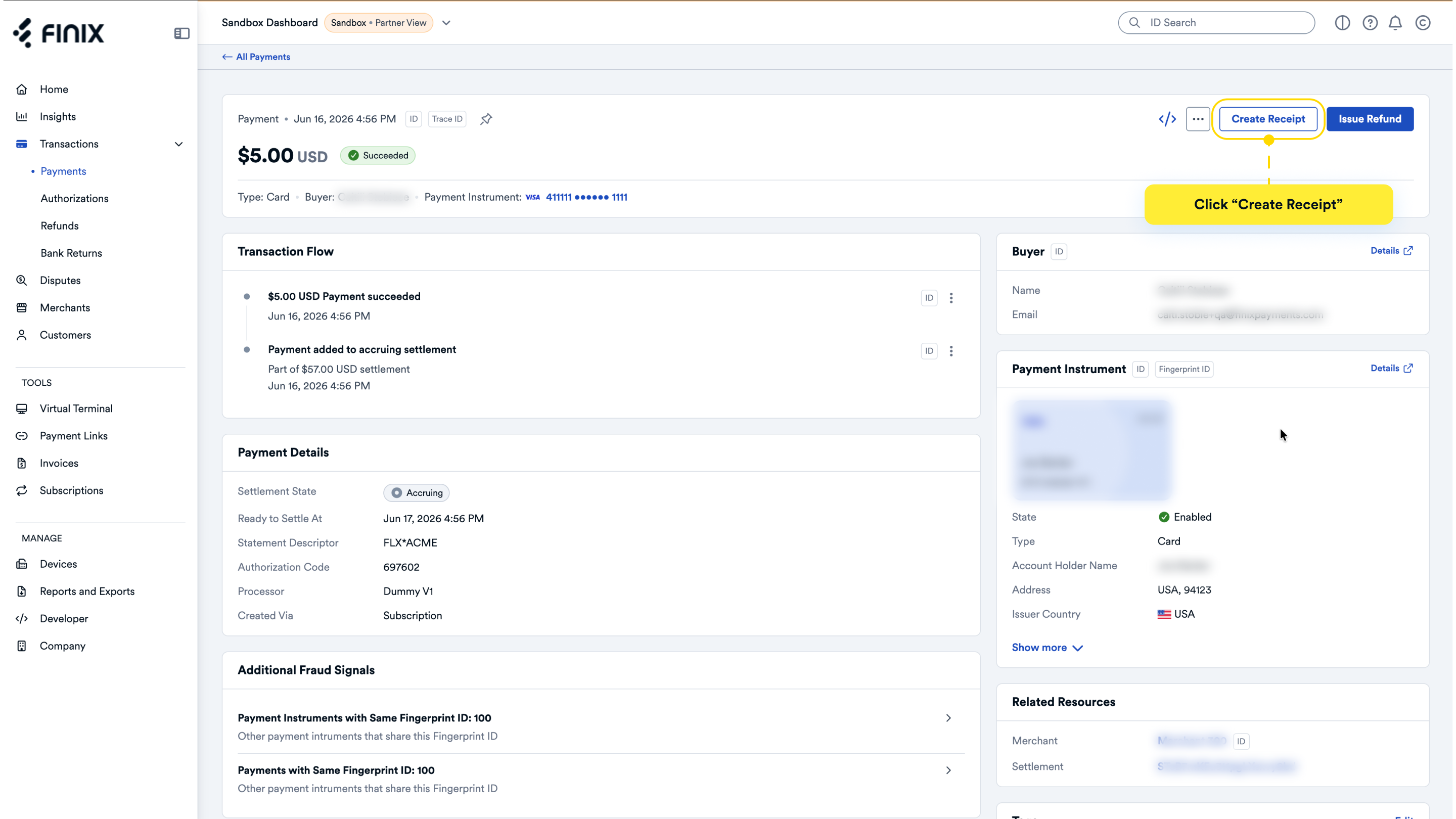
When you click into one of the supported flows, you will see an option to create a Receipt. Click on the three-dot icon on the top right corner and select Create Receipt.
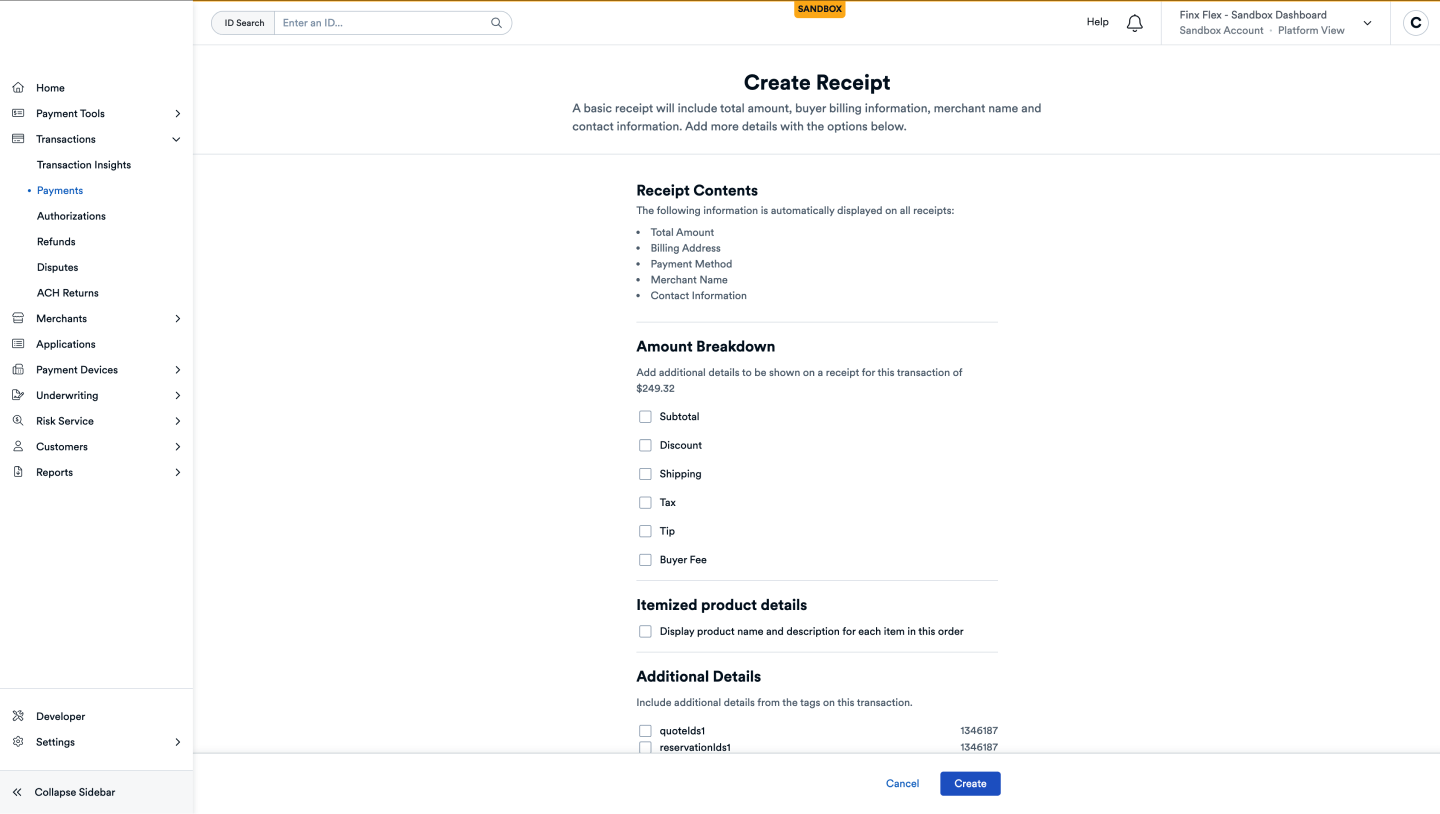
When creating a receipt, you can include an Amount Breakdown, which allows you to specify subtotals, discount amounts, shipping fees, taxes, tips, and any buyer fees that were applied. You can also choose to itemize the receipt by adding product names and descriptions for each item. You can also include details from tags of the transactions by adding labels and descriptions.
Once all details are added, you can either automatically send the receipt upon creation or choose to send it in the following step.
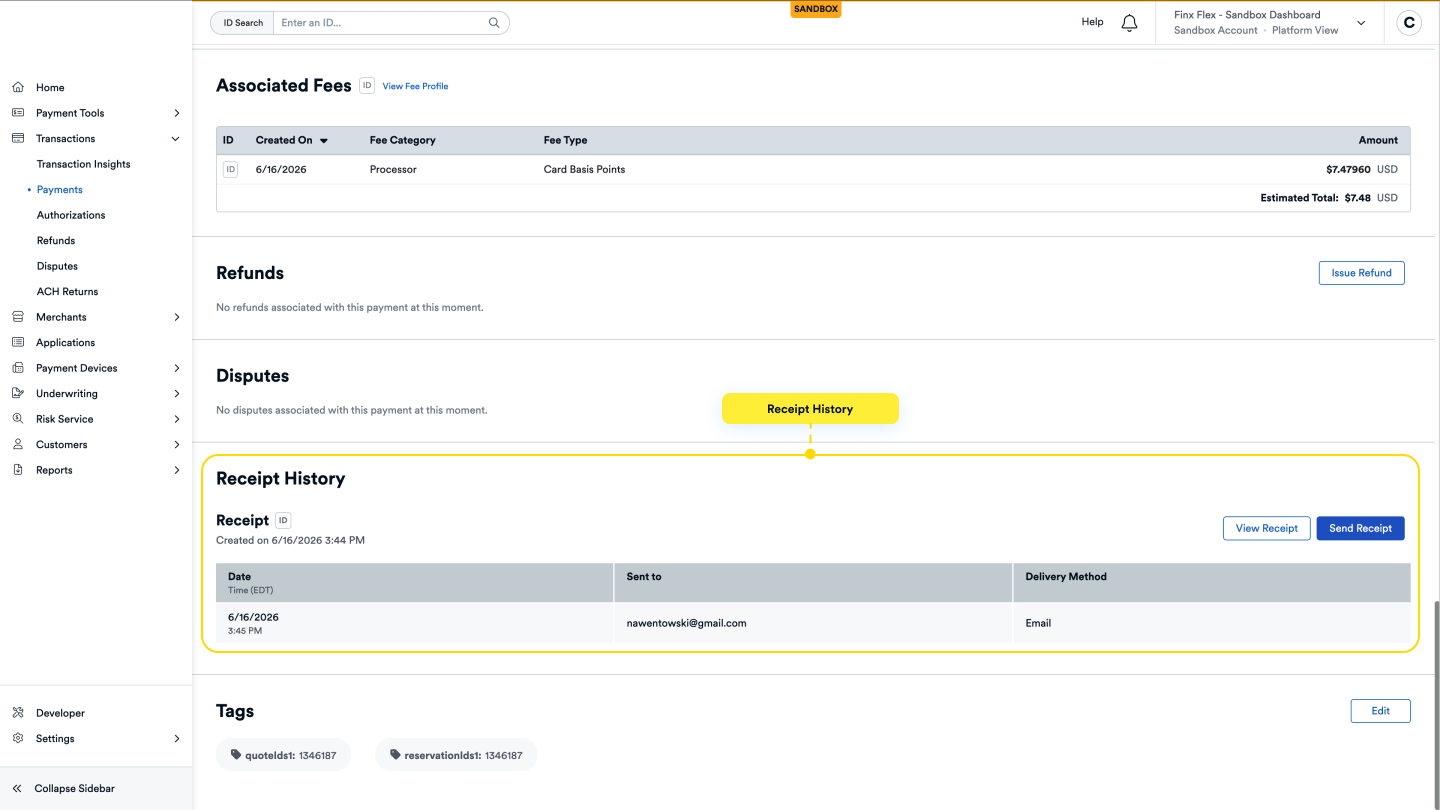
After a receipt is created, you can view it on the detail page of the resource. This page displays the receipt ID, a history of when the receipt was sent and to whom, and provides an option to send the receipt to additional recipients. All of this information is available in the Receipt History section.
You can create and send receipts for online payments through the API.
- Include the
entity_id, which must correspond to an ID from one of the supported payment flows. - Set
send_receipt_to_buyerto true to automatically send the receipt to the receiver. - Specify one or more delivery methods in the
requested_delivery_methodsobject.
The example below demonstrates how to create and send a receipt. Visit our API Reference to learn how to include additional details in your receipts.
curl -i -X POST \
  -u USfdccsr1Z5iVbXDyYt7hjZZ:313636f3-fac2-45a7-bff7-a334b93e7bda \
  https://finix.sandbox-payments-api.com/receipts \
  -H 'Content-Type: application/json' \
  -H 'Finix-Version: 2022-02-01' \
  -d '{
    "entity_id": "TRraKDGt53y1XeTbeCkXYMkn",
    "send_receipt_to_buyer": true,
    "requested_delivery_methods": [
      {
        "type": "EMAIL",
        "destinations": [
          "johndoe@gmail.com"
        ]
      },
      {
        "type": "SMS",
        "destinations": [
          "3346497818"
        ]
      },
      {
        "type": "PRINT",
        "destinations": [
          "DV12343234"
        ]
      }
    ]
}'{
"id": "receipt_cdGdu7mHL2DaEHHYf8PPg",
"created_at": "2024-07-30T00:26:55.87Z",
"updated_at": "2024-07-30T00:26:55.87Z",
"amount": 22300,
"currency": "USD",
"amount_breakdown": null,
"send_receipt_to_buyer": true,
"device_id": null,
"entity_details": {
"id": "TRraKDGt53y1XeTbeCkXYMkn",
"created_at": "2024-07-30T00:22:25.28Z",
"type": "TRANSFER"
},
"type": "BUYER",
"items": [],
"merchant_details": {
"id": "MUeDVrf2ahuKc9Eg5TeZugvs",
"business_name": "Dunder Mifflin",
"doing_business_as": "Dunder Mifflin",
"business_address": { … }
},
"payment_instrument_details": {
"id": "PIe2YvpcjvoVJ6PzoRPBK137",
"type": "PAYMENT_CARD",
"billing_address": { … },
"bin": "489514",
"brand": "VISA",
"card_type": "UNKNOWN",
"last_four": "0006",
"name": "Amy White"
},
"network_details": null,
"requested_delivery_methods": [
{ … },
{ … },
{ … }
],
"receipt_url": "https://receipt.sandbox-payments-checkout.com/TYPQp7",
"_links": {
"self": { … }
}
}On Payment Links, Subscriptions, Subscription Links, and Virtual Terminal, you'll see options to create receipts. This saves you an extra step of having to go to the resource later to manually create a receipt.
In Sandbox, receipts can only be sent to email addresses. Attempts to send a receipt to a phone number will be ignored, and no text message will be delivered.
We also have rate limiting in our sandbox to only 10 receipt delivery per day per Application.