Accept payments with Finix on SAP.

SAP is a global leader in enterprise software, trusted by the world's largest businesses to run their core operations across finance, procurement, supply chain, and commerce. Its flagship platform, provides a cloud-native ERP suite that unifies real-time data across business functions. Finix integrates with SAP through the Cybersource payment gateway via the SAP Digital Payments Add-on, enabling merchants to process payments and reconcile transaction data.
- Finix Live Account
- Active SAP landscape (S/4HANA, SAP Commerce Cloud, or related)
To create a Finix account, you can follow our step-by-step guide or sign up directly for a live or sandbox account.
We recommend choosing Direct Merchant as your Customer Type.
Finix supports SAP via our Cybersource Gateway integration. Please note that there is an additional fee for using our Cybersource integration.
For more information, please reach out to your Finix point of contact.
- To create a Cybersource integration, navigate to the Integrations page on your Finix Dashboard.
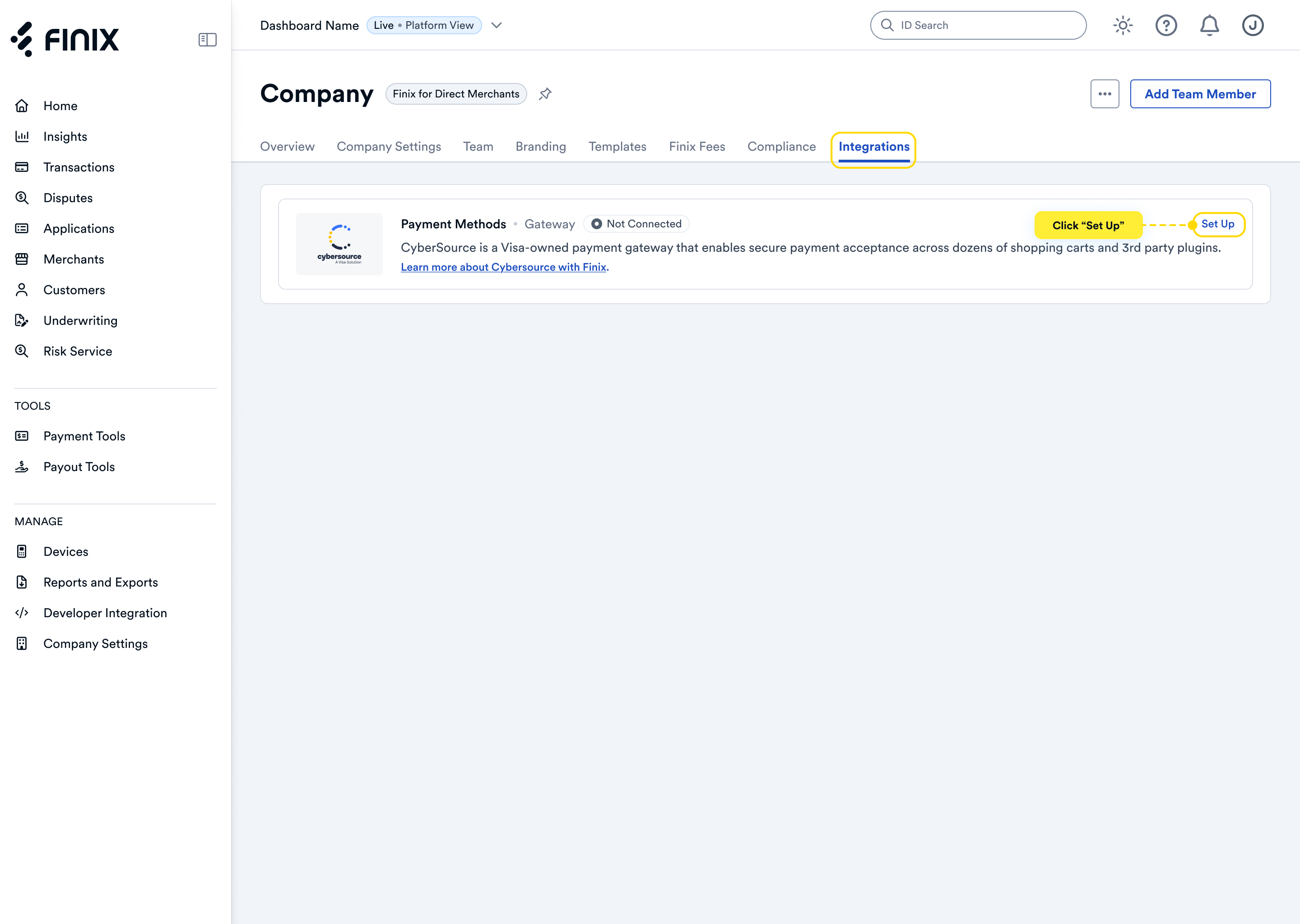
- Sign up for Cybersource. For detailed instructions, see the Cybersource integration guide.
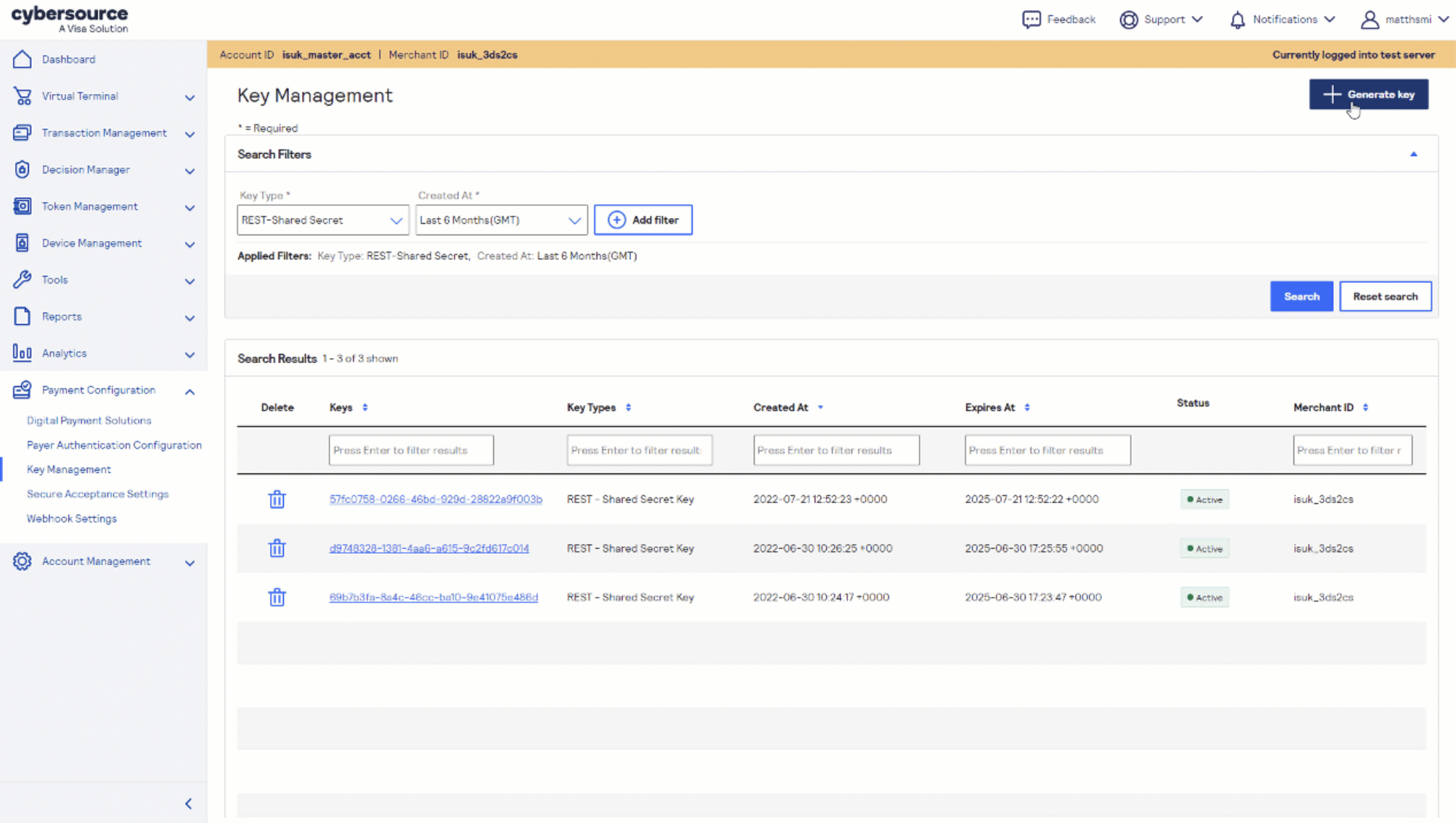
- After accepting the Cybersource invitation email, retrieve the following from the Cybersource Business Center under Payment Configuration → Key Management — you'll need these to configure SAP:
- Merchant ID (also called Organization ID)
- REST API Key
Before you proceed, ensure you have:
- Approved Finix Merchant Account
- Cybersource Gateway Integration linked to your Finix Merchant Account
- An active SAP landscape (S/4HANA, SAP Commerce Cloud, or related)
- Your SAP Tenant ID — required for MID mapping in Step 4
- Administrator access to your SAP Digital Payments Add-On instance
Install the SAP Digital Payments Add-On (DPA), the cloud-based connector that enables Cybersource payment processing across SAP applications. Follow SAP's deployment guide for your specific SAP landscape.
For full installation details, refer to the Cybersource SAP DPA developer documentation.
Contact the Cybersource SAP DPA integration team at GDLSAPDPA@visa.com with the following information:
- Your SAP Tenant ID
- Your Cybersource Merchant ID
- Whether the mapping is for TEST or PRODUCTION
The team will complete the MID-to-tenant mapping required to route payments through your Finix-provisioned Cybersource account.
Once the mapping is confirmed, navigate to the following URL in your SAP environment:
https://{{yourbaseURL}}/pspStatus/index.htmlSelect Cybersource from the list and activate it as your payment service provider. The system will display Active status upon successful activation.
Navigate to the following URL to confirm your Merchant ID is correctly configured:
https://{{yourbaseURL}}/pspDetermination/index.htmlVerify that your requested MIDs appear in the Merchant column. Once confirmed, your SAP environment is ready to process payments through Finix via the Cybersource gateway.
After completing configuration, you can now take payments through Finix via our Cybersource Gateway Integration.
To learn more about our Cybersource Gateway Integration, you can read our guide.
If you need additional assistance contact support@finix.com.
When you run a transaction on SAP, you'll see it:
- In your SAP dashboard under the Digital Payments Add-On transaction log.
- In the Cybersource Business Center.
- In your Finix Dashboard under Transactions → Payments.
These transactions will be ingested by Finix and added to Settlements. To track transfers between Finix and Cybersource, see how to locate Cybersource transactions.