# Cash App Pay with Low-Code / No-Code

![Scan to Pay QR code view for Cash App Pay](/assets/online-payments-cash-app-buyer-scan-view.170d15ea00a3126b3689dc5d9c19e0a39cccd2c6cd966f90a4935da7c0cecc04.08ff7529.png)

Cash-App Pay is available on Finix's no-code / low Code Products. Cash App Pay is supported across the following Finix no-code / low-code products:

| Product | Cash App Pay Support | Notes |
|  --- | --- | --- |
| **Payment Links** | Supported | Available via Dashboard and API. |
| **Checkout Pages** | Supported | Available via API only. |
| **Subscriptions** | Supported | Available via Dashboard and API. |
| **Subscription Links** | Supported | Available via Dashboard and API. |


Cash App Pay is in Early Access
Cash App Pay is currently in Early Access. To enable it on your Finix Application, reach out to your Finix point of contact or email [support@finix.com](mailto:support@finix.com).

## How It Works

When a buyer opens a Payment Link, Checkout Page, or Subscription Link that has Cash App Pay enabled, they'll see Cash App Pay as a checkout option. The buyer selects Cash App Pay and is guided through the Cash App authorization flow. Finix handles creating the payment instrument and processing the transaction automatically.

## What the Buyer Sees

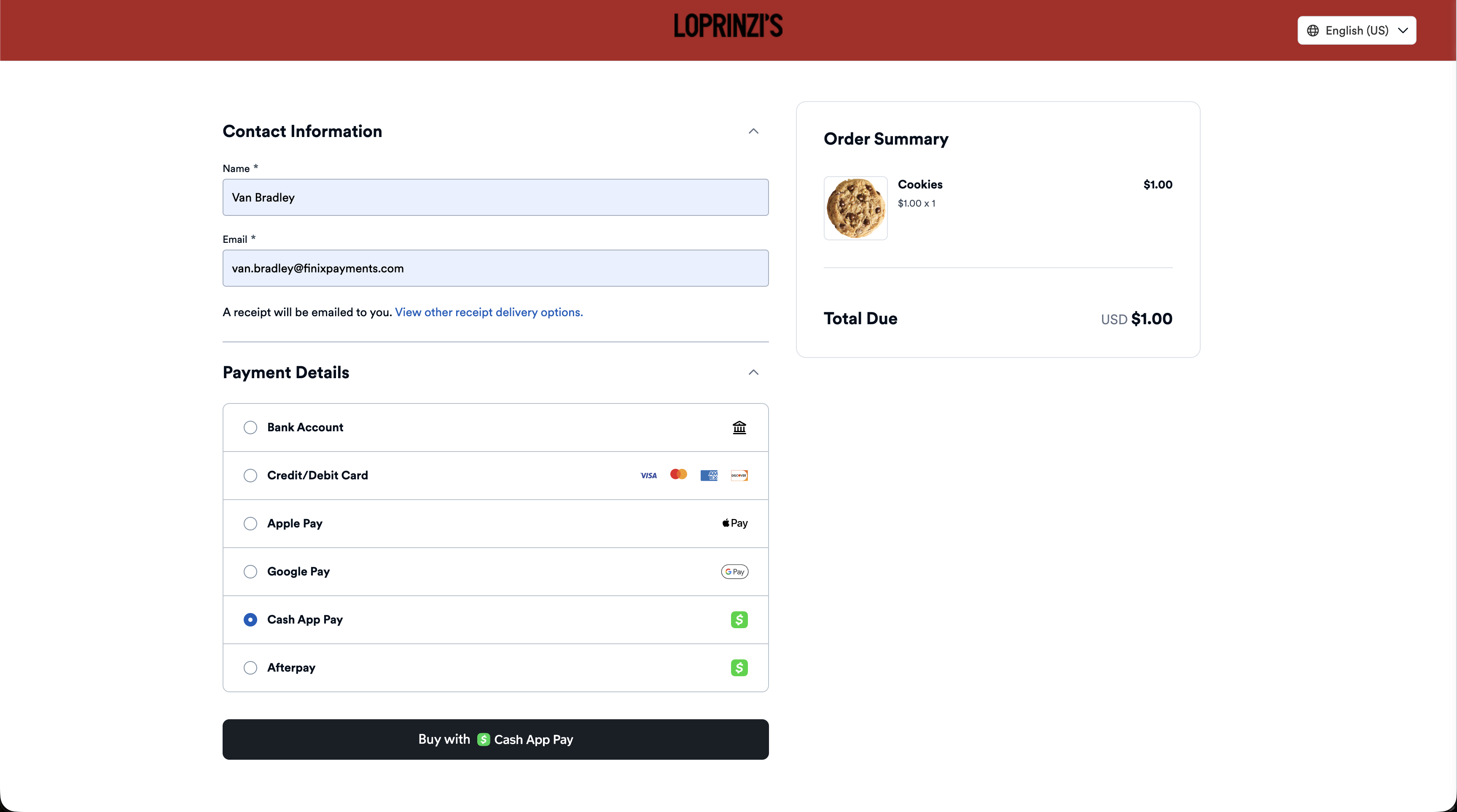
When a buyer opens a Payment Link, Checkout Page, or Subscription Link with Cash App Pay enabled, they'll see a **Cash App Pay** button alongside any other enabled payment methods.
![Buyer view of a Payment Link with Cash App Pay selected](/assets/online-payments-cash-app-payment-link-buyer-view.bef752e88727f9dbb8cdc96c92049608b17f61446f631747a234264721b046e2.08ff7529.png)

### Desktop View of Cash App

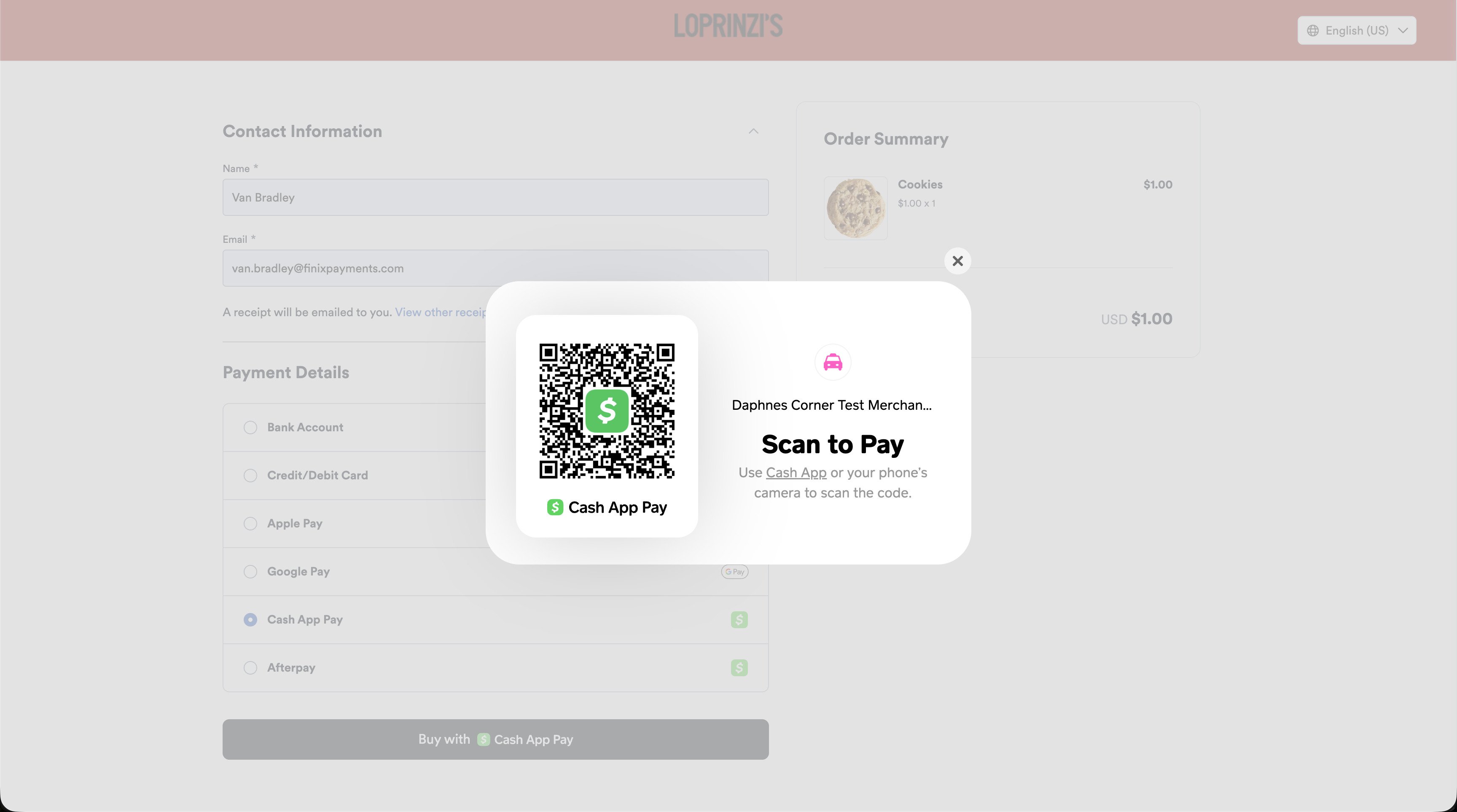
The buyer scans a QR code with their Cash App to authorize the payment.

![Scan to Pay QR code view for Cash App Pay](/assets/online-payments-cash-app-buyer-scan-view.170d15ea00a3126b3689dc5d9c19e0a39cccd2c6cd966f90a4935da7c0cecc04.08ff7529.png)

### Mobile View of Cash App

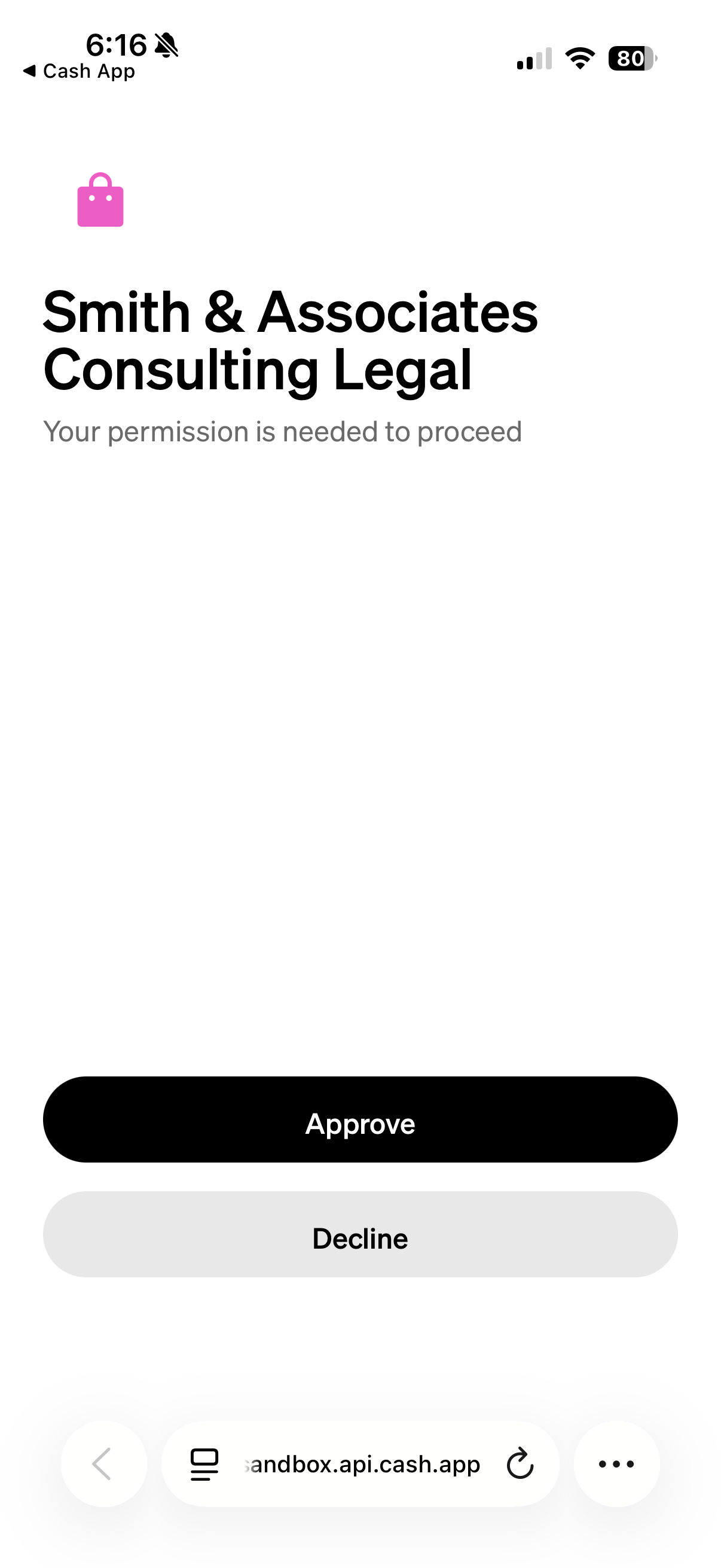
Tapping Cash App Pay redirects the buyer to the Cash App to confirm the payment. After authorization, they're returned to your checkout.
Mobile view of Cash App Pay approval
### Completing Transaction

Once the buyer completes authorization, Finix automatically creates the payment instrument and processes the transaction. No additional steps are needed on your end.

When a Buyer approves the Cash App Pay transaction, the payment will be complete on any of Finix's low-code products.

## Enabling Cash App Pay for your Application

Before you can use Cash App Pay in any low-code product, it must be enabled on your Finix Application.

## Enabling Cash App Pay on Low-Code / No-Code

You can enable Cash App Pay when creating or editing a Payment Link or Subscription Link in the Finix Dashboard.

### Payment Link

1. Log in to your [Finix Dashboard](https://finix.payments-dashboard.com/Login).
2. Navigate to **Payment Tools** > **Payment Links**.
3. Click **Create Payment Link** or select an existing link to edit.
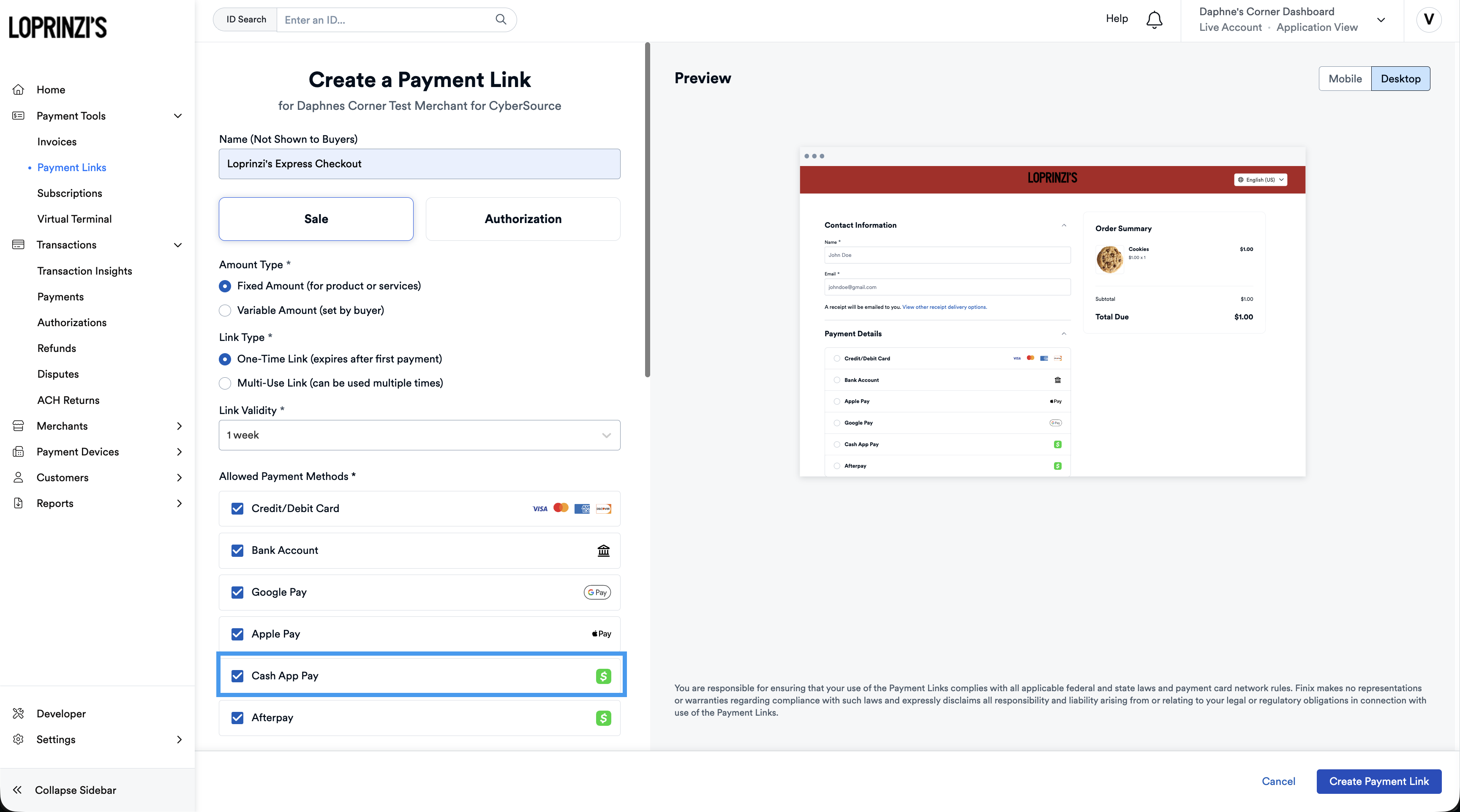
4. Under **Allowed Payment Methods**, enable **Cash App Pay**.
5. Complete the remaining fields and save.

![Enabling Cash App Pay on a Payment Link in the Finix Dashboard](/assets/payment_links_cash_app_pay.c2679c3519dd436b0cf1d80a3feba09fb9e120719b73f55b565f21050d4f5517.08ff7529.png)

### Subscription Link

1. Log in to your [Finix Dashboard](https://finix.payments-dashboard.com/Login).
2. Navigate to **Payment Tools** > **Subscriptions** > **Subscription Links**.
3. Click **Create Subscription Link**.
4. Under **Allowed Payment Methods**, enable **Cash App Pay**.
5. Complete the remaining fields and save.


### Using the API

To accept Cash App Pay through your low-code products, add `CASH_APP_PAY` to the `allowed_payment_methods` list when creating or updating a Payment Link, Checkout Page, or Subscription Link.

#### Payment Link

To create a Payment Link with Cash App Pay enabled, include `CASH_APP_PAY` in the `allowed_payment_methods` array:


```shell Create Payment Link with Cash App Pay
curl -i -X POST \
  -u USfdccsr1Z5iVbXDyYt7hjZZ:313636f3-fac2-45a7-bff7-a334b93e7bda \
  https://finix.sandbox-payments-api.com/payment_links \
  -H 'Content-Type: application/json' \
  -H 'Finix-Version: 2022-02-01' \
  -d '{
    "merchant_id": "MU7noQ1wdgdAeAfymw2rfBMq",
    "application_id": "APc9vhYcPsRuTSpKD9KpMtPe",
    "payment_frequency": "ONE_TIME",
    "is_multiple_use": false,
    "allowed_payment_methods": [
      "PAYMENT_CARD",
      "BANK_ACCOUNT",
      "APPLE_PAY",
      "GOOGLE_PAY",
      "CASH_APP_PAY"
    ],
    "amount_details": {
      "amount_type": "FIXED",
      "total_amount": 7500,
      "currency": "USD"
    },
    "additional_details": {
      "terms_of_service_url": "https://example.com/terms"
    }
  }'
```

For full API reference, see [Create Payment Link](/api/payment-links/createpaymentlink).

#### Checkout Pages

Checkout Pages are available via the API only. To create a Checkout Page with Cash App Pay enabled, include `CASH_APP_PAY` in the `allowed_payment_methods` array:


```shell Create Checkout Page with Cash App Pay
curl -i -X POST \
  -u USfdccsr1Z5iVbXDyYt7hjZZ:313636f3-fac2-45a7-bff7-a334b93e7bda \
  https://finix.sandbox-payments-api.com/checkout_forms \
  -H 'Content-Type: application/json' \
  -H 'Finix-Version: 2022-02-01' \
  -d '{
    "merchant_id": "MU7noQ1wdgdAeAfymw2rfBMq",
    "allowed_payment_methods": [
      "PAYMENT_CARD",
      "CASH_APP_PAY"
    ],
    "amount_details": {
      "amount_type": "FIXED",
      "total_amount": 5000,
      "currency": "USD"
    }
  }'
```

For full API reference, see [Create Checkout Form](/api/checkout-forms/createcheckoutform).

#### Subscription Links


```shell Create Subscription Link with Cash App Pay
curl -i -X POST \
  -u USfdccsr1Z5iVbXDyYt7hjZZ:313636f3-fac2-45a7-bff7-a334b93e7bda \
  https://finix.sandbox-payments-api.com/subscription_links \
  -H 'Content-Type: application/json' \
  -H 'Finix-Version: 2022-02-01' \
  -d '{
    "merchant_id": "MU7noQ1wdgdAeAfymw2rfBMq",
    "subscription_plan_id": "SUBPLNxxxxxxxxxxxxxx",
    "allowed_payment_methods": [
      "PAYMENT_CARD",
      "CASH_APP_PAY"
    ]
  }'
```