The Finix platform comprises many different resources that fit together. This guide describes Finix's Key Resources are and how they relate to one another.
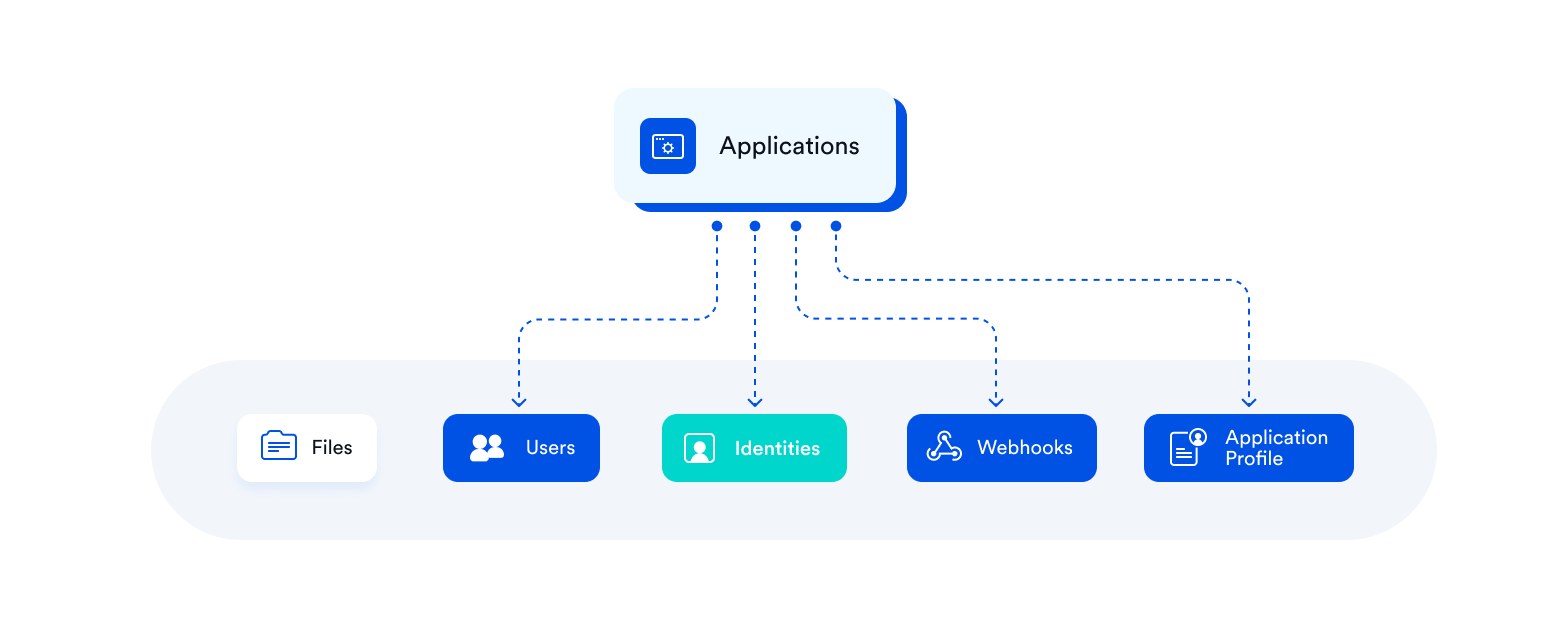
The Application resource represents your own business or platform within the Finix system. As this represents you, it is your root entity in Finix and most resources will include an application.id that points back to you.
Several resources are direct children of Applications, including Users, Identities, Webhooks, and your Application Profile. We cover these resources in detail below.
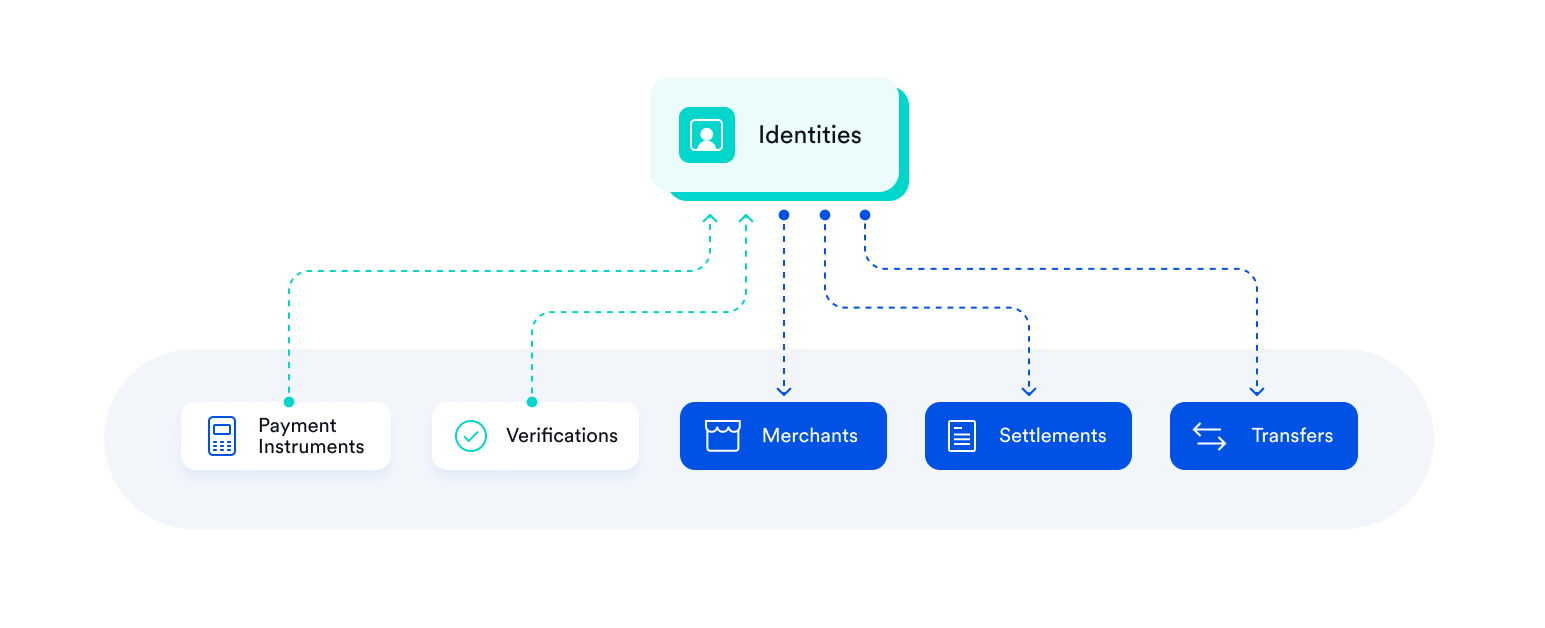
The Identity resource represents either an individual or business, and stores their information. You will create Identities for both the sellers and service providers you board to process payments, as well as their buyers:
- For users you board to accept payments (e.g., sellers, service providers, merchants): the
Identityresource includes Personally Identifying Information (PII) required for compliance and underwriting purposes, and they will go through the onboarding process before they can accept payments. - For their buyers: the
Identityresource can store any information you choose to include, such as their names, emails, addresses, or phone numbers.
Identities are central resources that link many other resources together:
- Payments (called
Transfers) and payment methods (calledPayment Instruments) get created under and linked with anIdentity. - The
Identityresource helps manage payments, payment methods, bank accounts, transaction history, identity verification, and payouts between buyers and sellers.
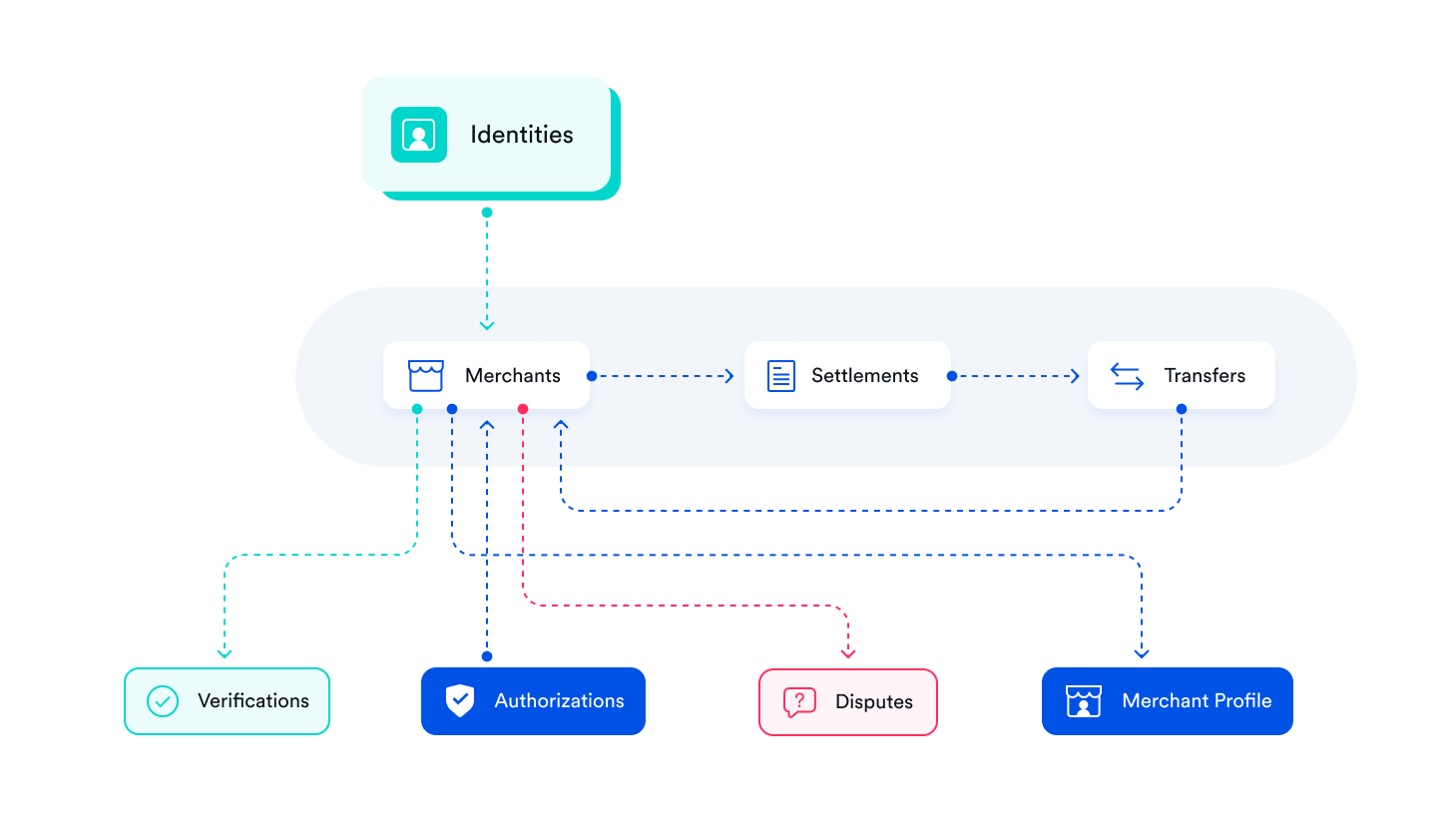
The Merchant resource represents the ability for an Identity to process payments. An Identity can only have one merchant resource.
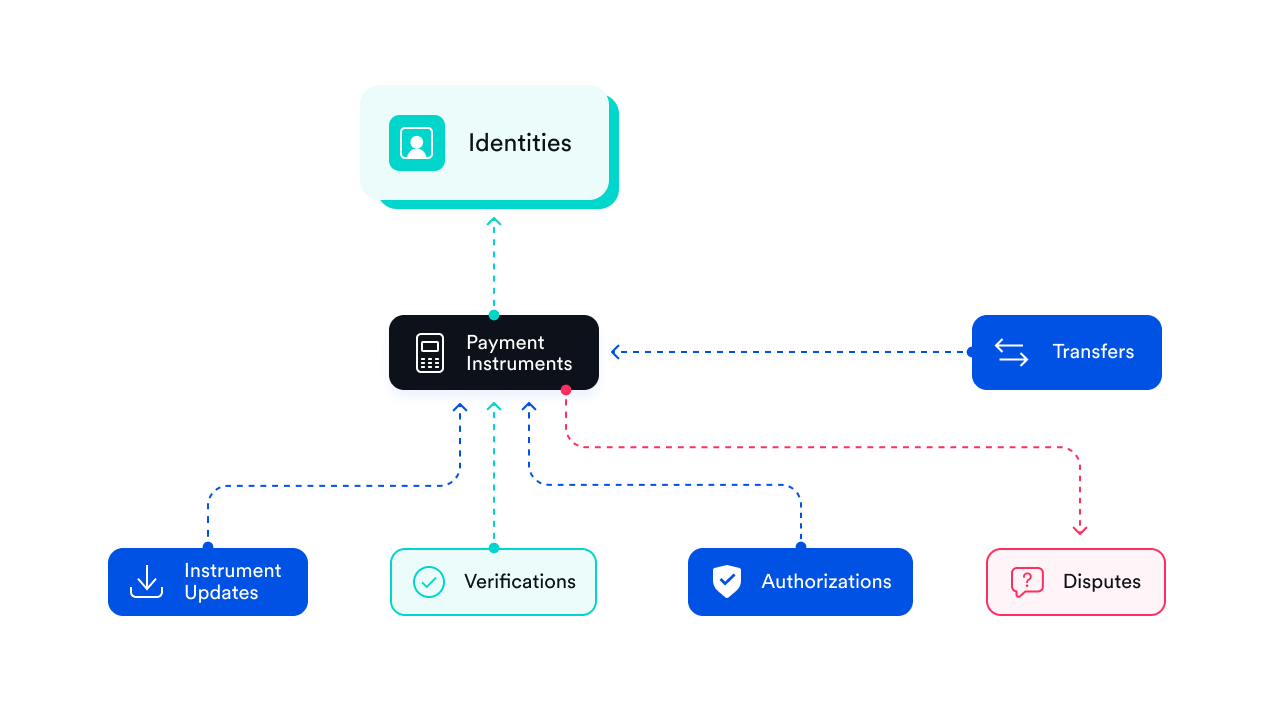
The Payment Instrument object represents a payment method (e.g., credit cards, bank accounts, tokens). When Payment Instruments are created, the payment method details get tokenized and stored securely (e.g., the card or bank account number). Each Payment Instrument has a unique id that represents the payment method in Finix moving forward.
Each Payment Instrument is created under an Identity and can only be linked to that one single Identity. Once created, a Payment Instrument cannot be disconnected from the Identity it was created under, or linked to another Identity.
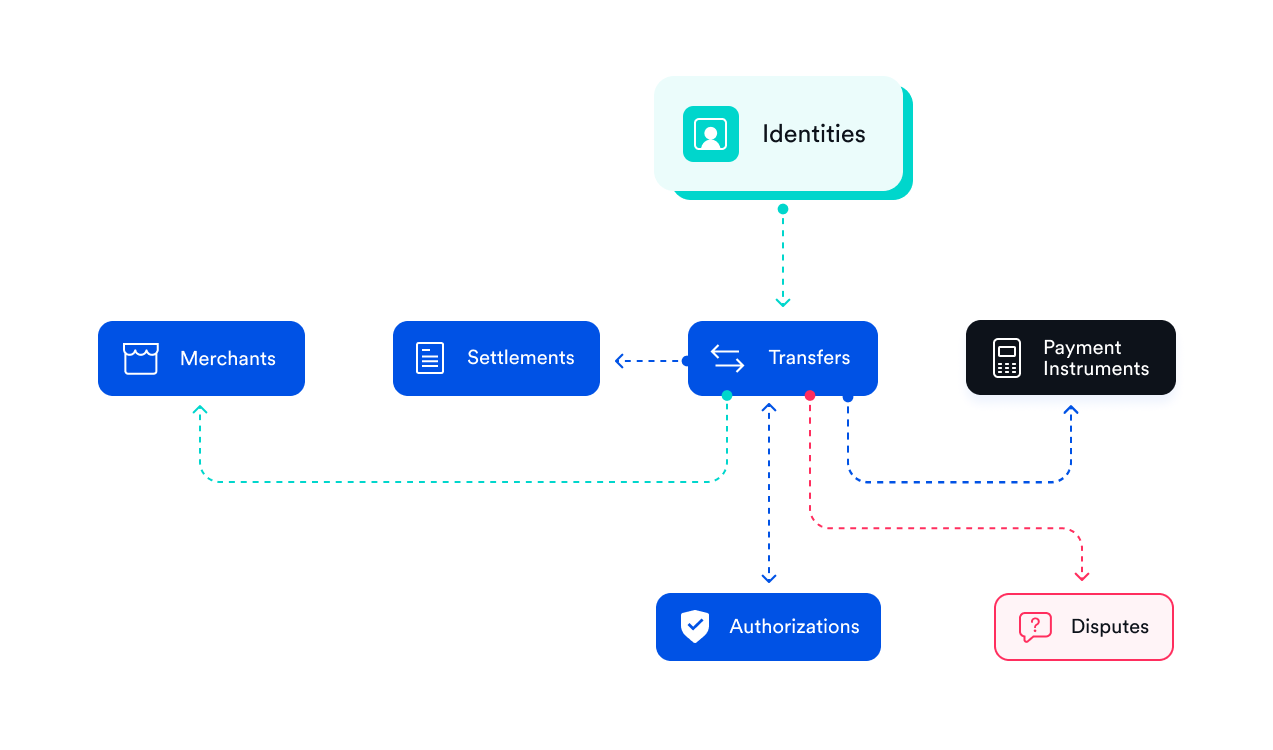
The Transfer resource represents any money movement from one Payment Instrument to another. For example, a Transfer can be a credit to a bank account, or a refund to a card. Transfers appear on the Finix Dashboard under Transactions.
Authorizations always create Transfers when captured; however, Transfers can get created for other reasons, including processing refunds, reversals, and paying out merchants.
Transfers can have one of three types, each indicating a different funds flow:
DEBIT: These are created after capturing Authorizations or creating ACH (eCheck) payments where funds are pulled from the issuer into the settlement account.REVERSAL: represent refunds or chargebacks where funds are returned to customers.CREDIT: are created when funds are transferred to a merchant's bank account when funding / payout out settlements.
Transfers can have six possible states:
PENDING: TheTransferis still processing. It will resolve to another state. If a transfer stays in PENDING for an extended period of time, reach out to Support.SUCCEEDED: The Transfer was successful, and the funds will soon be available for Payout. Theready_to_settle_atfield indicates when theTransferwill be included and batched into aSettlement.FAILED: The Payment was declined. Refer to thefailure_codeandfailure_messagefor details on why the transaction was declined.CANCELED: There was an issue with the processor, please reach out to support.UNKNOWN: A connection or timeout issue occurred while theTransfergot created or updated. Reattempt theTransfer.RETURNED: TheTransferwas returned by the bank, which can happen for ACH transactions (e.g., insufficient funds, invalid account). When aTransferis in this state, thebank_return_detailsobject is populated with thereason_code,reason_title, andreason_messageexplaining why the return occurred.
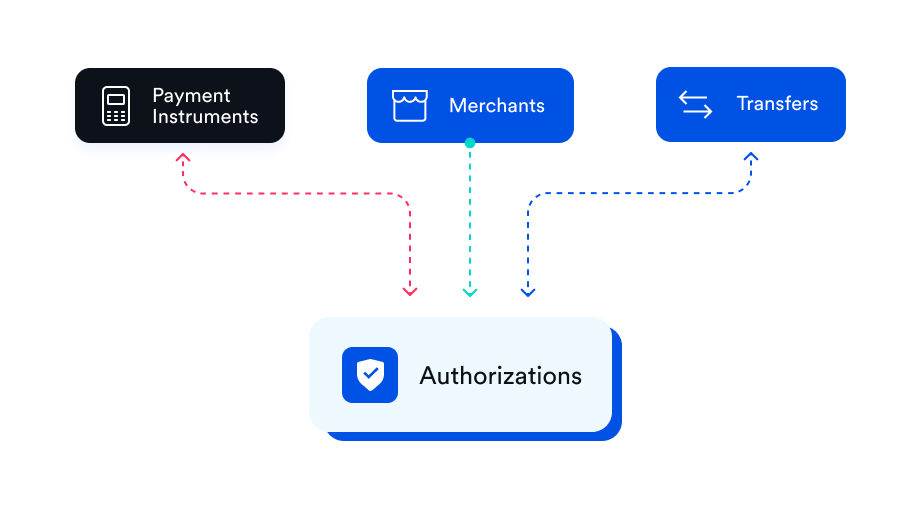
The Authorization resource represents a charge or card hold made by a Merchant to verify the buyer's payment method has the necessary funds.
When an Authorization is created, a specific amount gets reserved on the Payment Instrument associated with the Identity that represents the buyer. That amount is captured (i.e., debited) at a later date, usually within 7 days.
When an Authorization gets captured, a Transfer resource gets created to process the movement of funds.
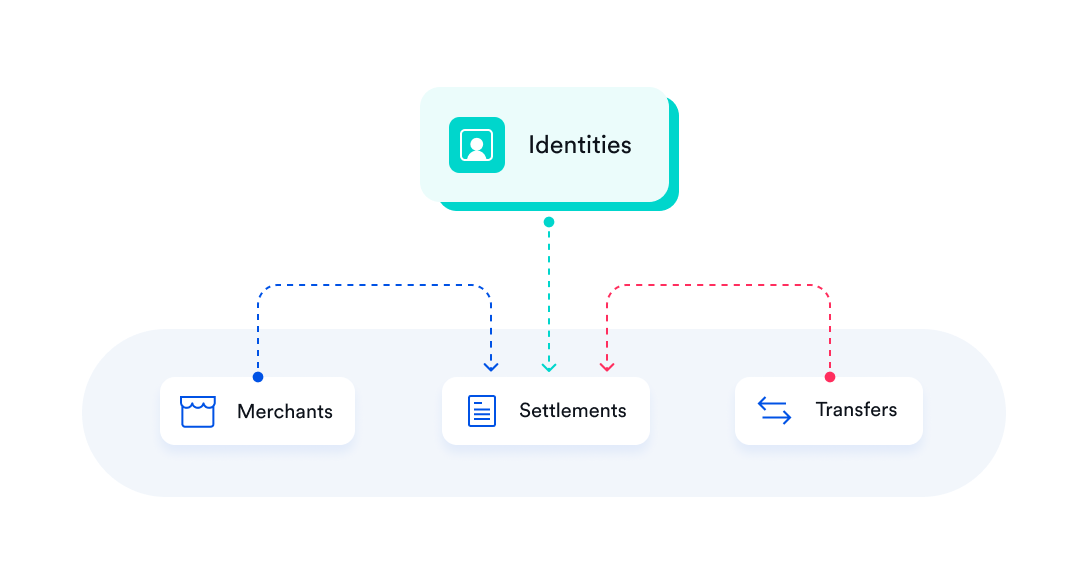
The Settlement resource represents a batch of Transfers that will get paid out to a Merchant. Merchants (i.e., sellers) are paid out when Finix approves them. For more information, see Payouts.
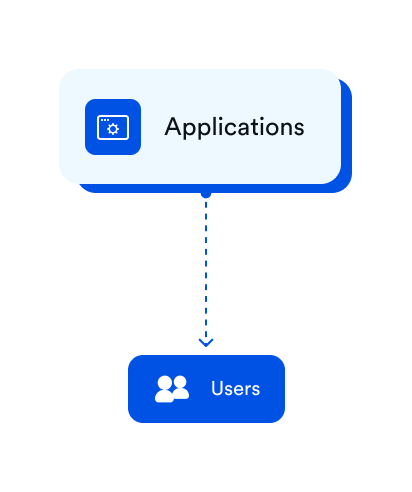
A User represents:
- Dashboard User
- API User
To Create a dashboard user, reach out to Finix support.
The File resource represents a file that is or will be uploaded to Finix. Files can be uploaded for any resource, though this is most often used during onboarding where documents may be required for an Identity or a Merchant.
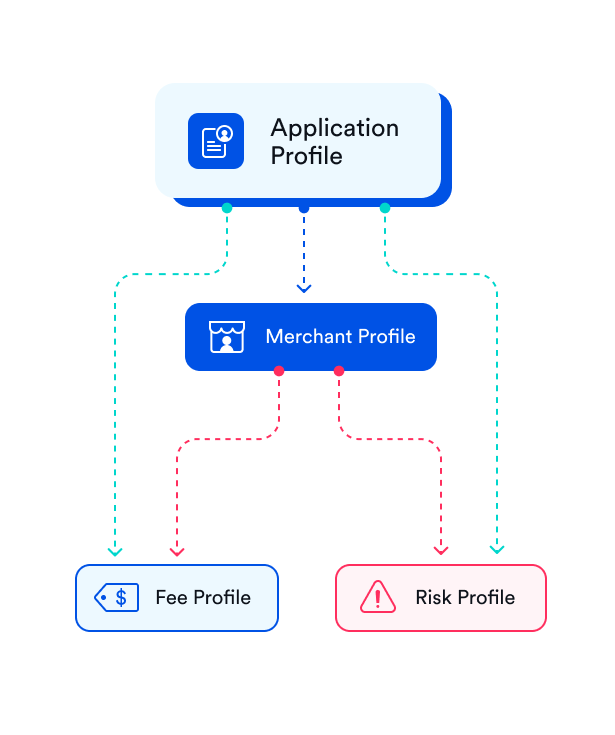
Finix uses a concept called "profiles" that enable you to define a root configuration for charging fees, risk settings, and payout schedules.
An Application Profile stores a base set of profiles: Fee Profile and risk_profile. Whenever you create a Merchant, a new Merchant Profile is created with a Fee Profile and risk_profile that are a copy of the profiles in the Application Profile.
Each Merchant will have its own, unique, Merchant Profile. Merchant profiles are not shared between merchants.
The merchant profile points to the Fee Profile and risk_profile that applies to the merchant
A Fee Profile specified how you will charge fees to your seller for their specific Merchant's payment processing. The fee profile contains a list of each fee type and the amount you want to charge the merchant.
A Risk Profile specifies the risk configuration for a Merchant.
You can change the profiles on a Merchant Profile and it will only affect the Merchant the Merchant Profile is associated to.
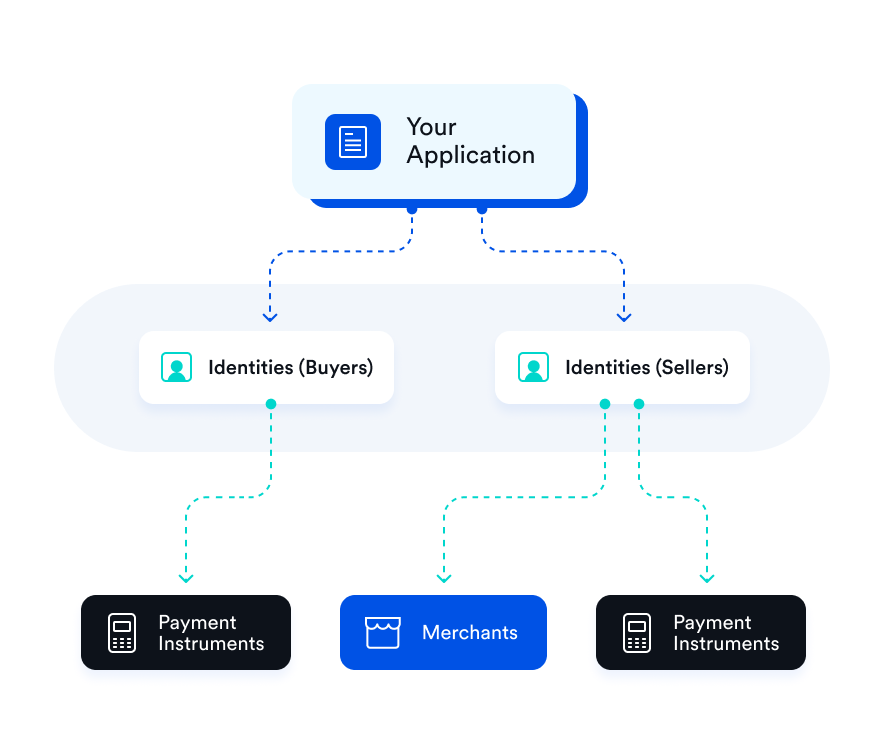
Finix enables many payment flows but the key account relationships start with your Application which is your main account. Your Application will have many Identities for your buyers and sellers or service providers.
For buyers, their Identities will have one or more Payment Instruments for each payment method they save with you.
For sellers or service providers, their Identities will have one or more Payment Instruments for the bank account their funds are paid out to. They will also have one or more Merchants for each payment capability you enable for them, such as enabling both online and in-store payments with one Identity.