Learn how to upload files to Finix.
To upload files from Finix's dashboard:
- Inside your dashboard, navigate to your Seller's Identity page
- On their Identity page, navigate to their Files tab
- Use the Upload File button to upload their file
You will see a green banner after the file uploads successfully.
To upload files with Finix's File API:
- Create a
Fileresource - Upload your file to the
Fileresource
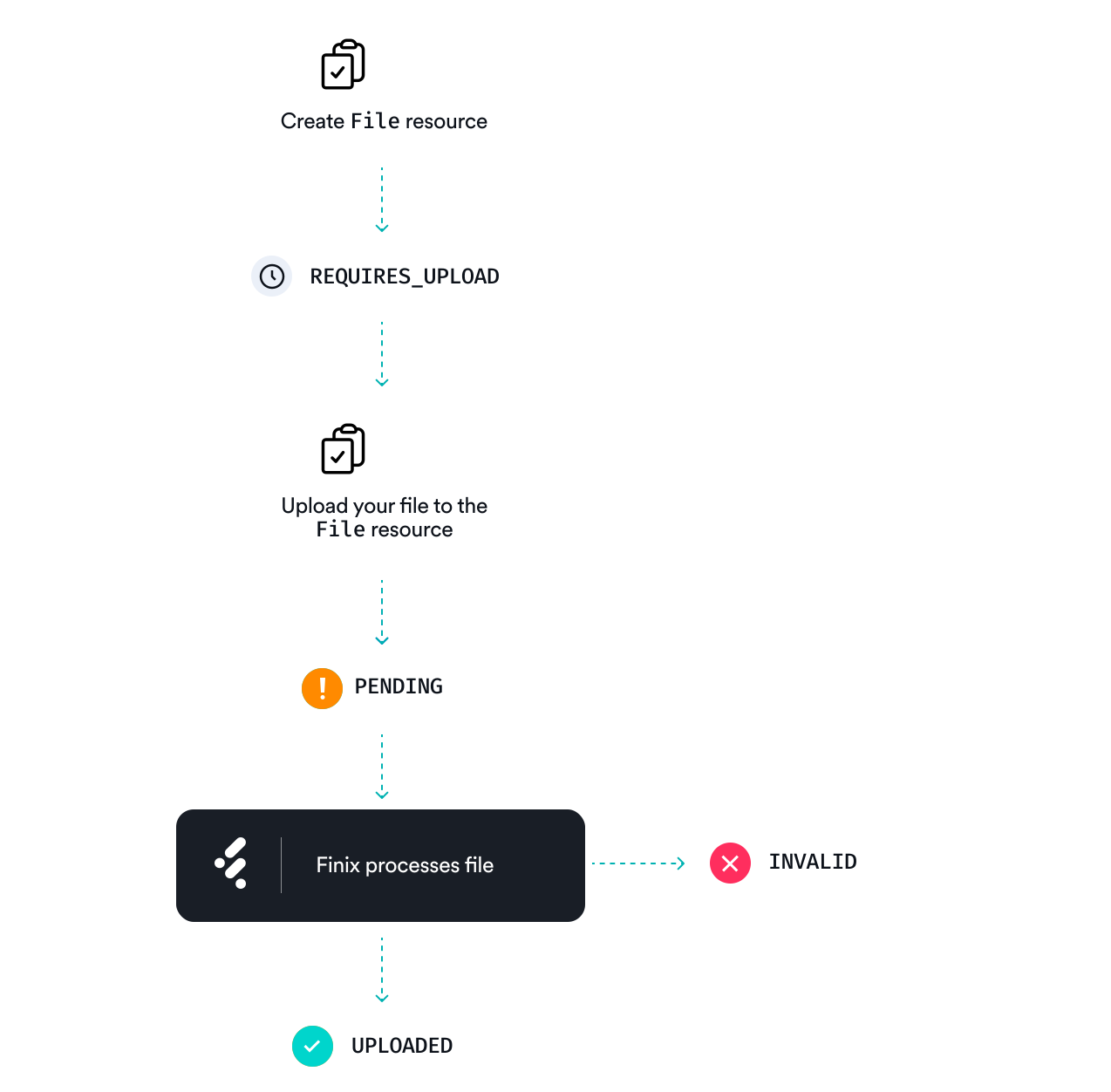
Create a File resource with the document's type, display name, and Merchant the file belongs to.
curl "https://finix.sandbox-payments-api.com/files" \
    -H 'Content-Type: application/json' \
    -H 'Finix-Version: 2022-02-01' \
    -u  USsRhsHYZGBPnQw8CByJyEQW:8a14c2f9-d94b-4c72-8f5c-a62908e5b30e \
    -X POST \
    -d '{
        "display_name": "Bank Statement (January 2024)",
        "linked_to": "MU2n7BSovtwYsWYZF6rBnnzk",
        "type": "DRIVERS_LICENSE_FRONT"
}'{
"id": "FILE_aw97EbTRshpyiCjdHXhd3t",
"status": "REQUIRES_UPLOAD",
"created_at": "2025-12-05T16:27:32.899574Z",
"updated_at": "2025-12-05T16:27:32.917596Z",
"linked_type": "MERCHANT",
"linked_to": "MUtaVJ3X6DFXfEox6fUSyqxt",
"extension": null,
"display_name": "Bank Statement (January 2024)",
"type": "BANK_STATEMENT",
"platform_id": "PLoMxXWbqwEMT5N1upSaNUbJ",
"application_id": "APc9vhYcPsRuTSpKD9KpMtPe",
"tags": {},
"identity_id": "ID47veZZgBXfRGv9ZkFdgCLt",
"entity_id": null,
"entity_type": null,
"size_in_bytes": null,
"file_name": null
}To upload your file to the File resource, you can either:
- Upload the file directly (for example, if the file is stored on your own servers).
- Use an
external_linkto let your seller upload the file directly from their browser.
Use the /upload endpoint to upload the file directly to the File resource:
curl "https://finix.sandbox-payments-api.com/files/FILE_qBwNnDHrpHv6xc1yQwLjNx/upload" \
    -H 'Content-Type: multipart/form-data' \
    -H 'Finix-Version: 2022-02-01' \
    -u USsRhsHYZGBPnQw8CByJyEQW:8a14c2f9-d94b-4c72-8f5c-a62908e5b30e \
    -F "file=@{{file_path}}"
This request is asynchronous. Finix will respond with a File object with status: PENDING, and afterward the status to UPLOADED after the file finishes uploading (typically, this takes about 60 seconds).
{
  "id": "FILE_qBwNnDHrpHv6xc1yQwLjNx",
  "status": "PENDING",
  "created_at": "2025-12-05T16:45:16.953723Z",
  "updated_at": "2025-12-05T16:46:06.017533Z",
  "linked_type": "MERCHANT",
  "linked_to": "MUvWVhLpLj9w7kV1EXA7yvzc",
  "extension": "csv",
  "display_name": "bank_statement",
  "type": "BANK_STATEMENT_ONE_MONTH",
  "platform_id": "PLoMxXWbqwEMT5N1upSaNUbJ",
  "application_id": "APc9vhYcPsRuTSpKD9KpMtPe",
  "tags": {},
  "identity_id": "IDnT3ff71VShf6dB2ShcPozq",
  "entity_id": null,
  "entity_type": null,
  "size_in_bytes": 312,
  "file_name": "bank_statement_11052025.csv"
}Alternatively, you can create an external_link that your user can use to upload the file directly from their browser. This lets your users upload documents without the files ever touching your own servers. To do this, start by creating an external_link with type: UPLOAD.
curl "https://finix.sandbox-payments-api.com/files/FILE_jyLRzpcLcvUh8yCuTdRJE8/external_links" \
    -H 'Content-Type: application/json' \
    -H 'Finix-Version: 2022-02-01' \
    -u  USsRhsHYZGBPnQw8CByJyEQW:8a14c2f9-d94b-4c72-8f5c-a62908e5b30e \
    -d '{
        "duration": 15,
        "type": "UPLOAD"
}'{
"id": "EL_3zJ3B4UYMWrLPyYSdL65hX",
"created_at": "2024-08-27T22:09:51.396334Z",
"url": "https://finix-file-quarantine-sb.s3.us-east-2.amazonaws.com/MERCHANT/MU2n7BSovtwYsWYZF6rBnnzk/DRIVERS_LICENSE_FRONT/FILE_vhbDpyGKGUAUtBZnBv67AQ/file?X-Amz-Security-Token=IQoJb3JpZ2luX2VjEAYaCXVzLWVhc3QtMiJHMEUCIQDqZMMyXnwQkuWLRrOOyLoQnqaOZKpz8UDTq07CDgdDrgIgL1XJpGqc9nJPAJ6vHOgxG%2F8XRsxD4idH7dQ%2BrdnKlG4q%2BQQIHxACGgwzNzU2MzU1NzAwNzAiDHZtIXMx1embf%2BSOMirWBB77UW%2FTQu19mMt7ERQjJ5IYVR%2BykbtVYVQXFYrVLg6Hla5Qv8ncxm3%2BiWnN9%2BcWlnz1d0g1lX7indpff8tjHbnZRrLVNbfJbKQISRgb5qIxcHKXfUuvZvBYKhlqZe%2BEJ3x%2BbD1A4EdLf35wRFq%2FZscST24XGIQkB99GaJeaEH0pL%2BrWdhgE%2FpJHxuTfCVVR6sia7tLltC3CSwd8DJZCrqIEZjaFa69I%2FXvcwnz3VRvofEcgUcbEGTrUCmWS3cK1IpcvBZg1dQj4KC6Ds8%2FSK7DaWDfEtYpwyKfRVGDE6PzbHsNHkn7GEtM7%2FQcZ18mReMOzb0kjd5apPvbrLJiduxOAJC3q7lRRn3NN24mhc844PLrZAKgD4XqDuRUzh1IQrCByWAE%2Boq8pnRwGMfMzVHkr%2FXCiJrQzt7rGh1okNxFx8WR5You4xN1uHLeZuN9AHa37wMB%2FMAIS12NwmHwSy9WO5c60rnS8sof0qCEiN4Qx3uLr8LLc%2F3JeEEni1Tb2Og3kcnY0qZmSXKHZe7r3dSvet6RVT33Cxt8YIzwKWdCMy%2FT7ACE%2Br5mJWMynmLXfs%2B2nceYYWoabSTAoMte%2BRz%2BgsCqmTRg9eXns8ITFH7nxakDhf3zLDqByWHIkBRlv0SVAKb%2F31tGzeAdGheAF1zaltbVEnAwz7U0zFPeDtKpRXxiBcXivUpHHHEkXHJeIHjdfM1r%2FH6E7ASY4CSvbw3eMEw9j1EB0eLxej8xquTRpW6%2F5adT0bcfM0ZGEt3EjD7YFKtGvs4wuzmhG4imJS7c%2BoAnFXIww1pm5tgY6mgFXwaweuRLsT4LlKvxRBw1Kj0%2BeyMjTwgWnINHAVGzrmt4XHfHrZxEyY0CCF%2Fw%2B1yjxxRFwMT83zzgI4YzLF%2FX6nK989O9Lv%2F6QrIO%2Fx5am9ksDCybEkth5u1hkSuaUV4pZP4fZjSqTzM1j%2B3JMVSPsVdnCVPW8UFTKuuFk1y62ImovKuAcET1Pq4JRUc2AZkjNPRUkC6HewLSk&X-Amz-Algorithm=AWS4-HMAC-SHA256&X-Amz-Date=20240827T220951Z&X-Amz-SignedHeaders=host&X-Amz-Expires=899&X-Amz-Credential=ASIAVO5M75WLGULA5QPJ%2F20240827%2Fus-east-2%2Fs3%2Faws4_request&X-Amz-Signature=5e973b4aa7a7f6ac4026b88bf1470efa334bde06adb51837e559b74c7df06ae6",
"type": "UPLOAD",
"expires_at": "2024-08-27T22:24:51.380464Z",
"user_id": "USsRhsHYZGBPnQw8CByJyEQW",
"file_id": "FILE_vhbDpyGKGUAUtBZnBv67AQ",
"duration": null,
"tags": {},
"expired": false
}See below for an example of how to embed the external_link into an HTML form, including making a PUT request to the url to upload the file.
<!DOCTYPE html>
<html lang="en">
  <head>
    <meta charset="utf-8" />
    <title>File Upload</title>
  </head>

  <body>
    <form id="upload">
      <input type="file" id="file" name="filename" />
      <input type="submit" />
    </form>
  </body>
  <script>
    const postFile = async function (e) {
      // Step 2: Include a script so the HTML form can accept file uploads
      e.preventDefault();
      // Step 3: Include the domain of Finix's API and your username and credentials
      const file = document.getElementById("file").files[0];
      const api = "https://finix.sandbox-payments-api.com/";

      const username = "USsRhsHYZGBPnQw8CByJyEQW"; // replace with your username
      const password = "8a14c2f9-d94b-4c72-8f5c-a62908e5b30e"; // replace with your password

      const request_headers = {
        Authorization: "Basic " + window.btoa(username + ":" + password),
        "Content-Type": "application/json",
      };

      // Step 4: Create the File resource
      const file_response = await fetch(`${api}/files`, {
        method: "POST",
        headers: request_headers,
        body: JSON.stringify({
          display_name: file.name, // Set a display name for the file
          linked_to: "MU2n7BSovtwYsWYZF6rBnnzk", // Include the merchant ID the file is being uploaded for
          type: "DRIVERS_LICENSE_FRONT", // The type of file being uploaded
        }),
      });

      const file_data = await file_response.json();
      const file_id = file_data.id;

      // Step 5: Create an external link to upload the file to
      const external_link_response = await fetch(
        `${api}/files/${file_id}/external_links`,
        {
          method: "POST",
          headers: request_headers,
          body: JSON.stringify({ type: "UPLOAD" }),
        },
      );

      const external_link_data = await external_link_response.json();
      const upload_url = external_link_data.url;

      // Step 6: Prompt your user to upload the file directly
      const upload_response = await fetch(upload_url, {
        method: "PUT",
        headers: {
          "Content-Type": "multipart/form-data",
        },
        body: file,
      });

      if (upload_response.status === 200) {
        alert("File successfully uploaded");
      } else {
        alert("There was an error uploading the file");
      }
    };

    document.getElementById("upload").addEventListener("submit", postFile);
  </script>
</html>- Type:
BANK_STATEMENT_ONE_MONTH - Accepted documents: 1 month bank statements, signed bank verification letter, and voided checks
- Expected format: Account number, routing number, and account owner name must be clearly visible
- Type:
BANK_STATEMENT_THREE_MONTHS - Accepted documents: 3 month bank statements
- Expected format: Account number, routing number, and account owner name must be clearly visible
- Type:
BUSINESS_INCORPORATION_DOCUMENT - Accepted documents: Articles of Incorporation
- Expected format: Must be original business registration document
- Type:
BUSINESS_REGISTRATION_DOCUMENT - Accepted documents: Secretary of State filing
- Expected format: Must be active state filing
- Type:
BUSINESS_TAX_ID_DOCUMENT - Accepted documents: Form CP-575, Form 147C
- Expected format: Must not be EIN Application form
- Type:
BUSINESS_TAX_EXEMPTION_STATUS_DOCUMENT - Accepted documents: Form 1023-EZ, Form T3010 (CAN)
- Expected format: Must prove business tax exemption status
- Type:
BUSINESS_ADDRESS_DOCUMENT - Accepted documents: Utility bill, lease
- Expected format: Must display active business address
- Type:
BUSINESS_OWNERSHIP_STRUCTURE - Accepted documents: Diagram, cap table
- Expected format: Must illustrate business ownership structure
- Type:
OWNER_GOVERNMENT_ISSUED_PHOTO_ID - Accepted documents: Driver's License, passport, residence card
- Expected format: Must clearly show owner's name and face and not be expired
- Type:
OWNER_TAX_ID_DOCUMENT - Accepted documents: SSN Card, TIN Card, SIN Card (CAN)
- Expected format: Must clearly show owner's name and tax ID and not be expired