FinixConfig holds the credentials and device configuration used to initialize the SDK. Pass it to the FinixClient constructor.
FinixConfig shape
FinixConfig(
    environment: Finix.Environment,
    credentials: Finix.APICredentials,
    merchantId: String,
    mid: String,
    deviceType: DeviceType,
    deviceId: String,
    serialNumber: String? = nil
)| Field | Type | Description |
|---|---|---|
environment | Finix.Environment | .Sandbox for testing, .Production for live payments. |
credentials | Finix.APICredentials | Your Finix API username and password. See APICredentials. |
merchantId | String | Your Finix Merchant ID (MU...). |
mid | String | Merchant identifier number. Pass an empty string if not required. |
deviceType | DeviceType | Set to .Pax for the PAX D135. |
deviceId | String | The Finix Device ID (DV...) created during device setup. Pass an empty string on first initialization; update via finixClient.update(deviceId:) after device discovery. |
serialNumber | String? | Optional. The physical serial number printed on the PAX D135 device. |
Finix.APICredentials shape
Finix.APICredentials(
    username: String,
    password: String
)| Field | Type | Description |
|---|---|---|
username | String | Your Finix API key. |
password | String | Your Finix API secret. |
The API credentials you use must have the appropriate role:
ROLE_MERCHANT- for single-merchant devices. Recommended for dedicated point-of-sale hardware.ROLE_PARTNER- required for multi-merchant devices and split transactions.
Use ROLE_MERCHANT credentials to scope a device to a single merchant. Use ROLE_PARTNER credentials if the device will process payments across multiple merchants. Note that split transactions require ROLE_PARTNER credentials.
Create ROLE_MERCHANT credentials
Once created, you can use ROLE_MERCHANT credentials across multiple devices as long as the devices are associated to the same Merchant.
- Sandbox serverhttps://finix.sandbox-payments-api.com/identities
curl -i -X POST \
  -u USfdccsr1Z5iVbXDyYt7hjZZ:313636f3-fac2-45a7-bff7-a334b93e7bda \
  https://finix.sandbox-payments-api.com/identities \
  -H 'Content-Type: application/json' \
  -H 'Finix-Version: 2022-02-01' \
  -d '{
    "additional_underwriting_data": {
      "annual_ach_volume": 0,
      "average_ach_transfer_amount": 0,
      "average_card_transfer_amount": 0,
      "business_description": "string",
      "card_volume_distribution": {
        "card_present_percentage": 0,
        "ecommerce_percentage": 0,
        "mail_order_telephone_order_percentage": 0
      },
      "credit_check_allowed": true,
      "credit_check_ip_address": "string",
      "credit_check_timestamp": "string",
      "credit_check_user_agent": "string",
      "merchant_agreement_accepted": true,
      "merchant_agreement_ip_address": "string",
      "merchant_agreement_timestamp": "string",
      "merchant_agreement_user_agent": "string",
      "refund_policy": "MERCHANDISE_EXCHANGE_ONLY",
      "volume_distribution_by_business_type": {
        "business_to_business_volume_percentage": 0,
        "business_to_consumer_volume_percentage": 0,
        "consumer_to_consumer_volume_percentage": 0,
        "other_volume_percentage": 0,
        "person_to_person_volume_percentage": 0
      }
    },
    "entity": {
      "ach_max_transaction_amount": 0,
      "amex_mid": 0,
      "annual_card_volume": 0,
      "business_address": {
        "city": "string",
        "country": "string",
        "line1": "string",
        "line2": "string",
        "postal_code": "string",
        "region": "string"
      },
      "business_name": "string",
      "business_phone": "string",
      "business_tax_id": "string",
      "business_type": "ASSOCIATION_ESTATE_TRUST",
      "default_statement_descriptor": "string",
      "discover_mid": 0,
      "dob": {
        "day": 1,
        "month": 1,
        "year": 1900
      },
      "doing_business_as": "string",
      "email": "string",
      "first_name": "string",
      "has_accepted_credit_cards_previously": true,
      "incorporation_date": {
        "day": 0,
        "month": 0,
        "year": 0
      },
      "last_name": "string",
      "max_transaction_amount": 0,
      "mcc": "string",
      "ownership_type": "PRIVATE",
      "personal_address": {
        "line1": "string",
        "line2": "string",
        "city": "string",
        "region": "string",
        "postal_code": "string",
        "country": "ABW"
      },
      "phone": "string",
      "principal_percentage_ownership": 0,
      "short_business_name": "string",
      "tax_authority": "string",
      "tax_id": "string",
      "title": "string",
      "url": "string"
    },
    "identity_roles": [
      "SELLER"
    ],
    "tags": {},
    "type": "BUSINESS"
}'{
"id": "USoR21bF52KLZpbQCptrexpH",
"created_at": "2025-12-08T18:35:51.41Z",
"updated_at": "2025-12-08T18:35:51.41Z",
"created_by": "USfdccsr1Z5iVbXDyYt7hjZZ",
"email": null,
"enabled": true,
"first_name": null,
"identity": "IDjvxGeXBLKH1V9YnWm1CS4n",
"last_name": null,
"last_used_date": null,
"password": "f2fd7118-66c3-495c-8942-8178e0ea9d0c",
"role": "ROLE_MERCHANT",
"tags": {},
"_links": {
"self": {
"href": "https://finix.sandbox-payments-api.com/users/USoR21bF52KLZpbQCptrexpH"
},
"applications": {
"href": "https://finix.sandbox-payments-api.com/applications"
},
"application": {
"href": "https://finix.sandbox-payments-api.com/applications/APc9vhYcPsRuTSpKD9KpMtPe"
}
}
}Create ROLE_PARTNER credentials
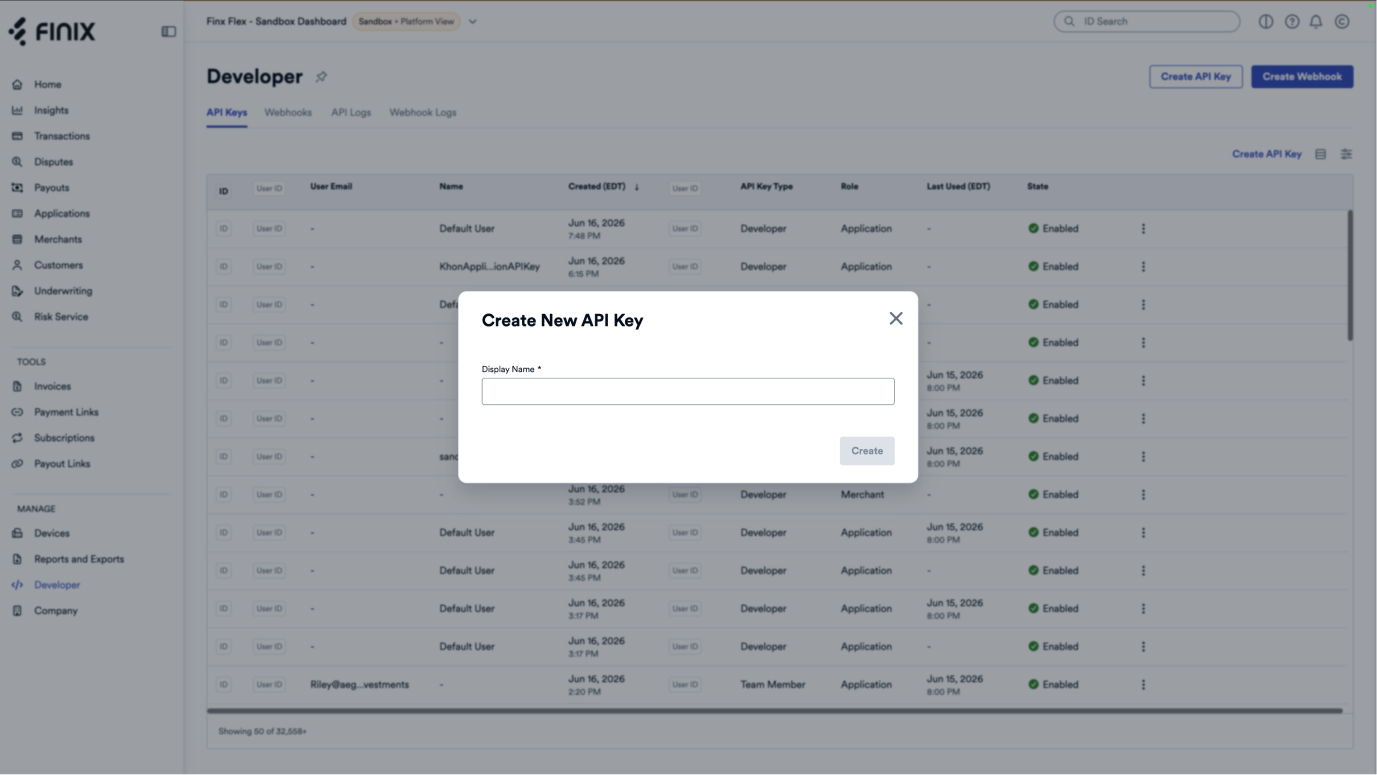
- Log in to the Finix dashboard.
- Select the environment for which you would like to create API credentials (Sandbox or Live).
- In the bottom left corner, select the Developer section.
- In the API Keys section, select Create API Key.
Sandbox and production
Set environment to match the environment your device is designated for. Devices cannot switch environments after designation.
| Value | Environment |
|---|---|
.Sandbox | Sandbox |
.Production | Production |
FinixConfig(
    environment: environment,
    credentials: Finix.APICredentials(username: username, password: password),
    merchantId: merchantId,
    mid: mid,
    deviceType: .Pax,
    deviceId: deviceId,
    serialNumber: serialNumber // optional
)

Finix.APICredentials(
    username: "USxxxxxxxxx",
    password: "your_api_secret"
)

// Sandbox
FinixConfig(
    environment: .Sandbox,
    credentials: Finix.APICredentials(username: "USxxxxxxxxx", password: "your_api_secret"),
    merchantId: "MUxxxxxx",
    mid: "",
    deviceType: .Pax,
    deviceId: ""
)

// Production
FinixConfig(
    environment: .Production,
    credentials: Finix.APICredentials(username: "USxxxxxxxxx", password: "your_api_secret"),
    merchantId: "MUxxxxxx",
    mid: "",
    deviceType: .Pax,
    deviceId: ""
)