Use webhooks to subscribe to automated notifications (also known as events) from Finix.
When an event is triggered, Finix sends an HTTP POST request to the endpoint URL configured in the webhook. Rather than requiring your servers manually poll Finix's API to learn about changes to your resources, webhooks push notifications to the endpoint URL to notify you automatically.
With webhooks, you can keep up with asynchronous state changes. Examples of changes include:
Transferis created.Merchantis approved.Disputesare won.
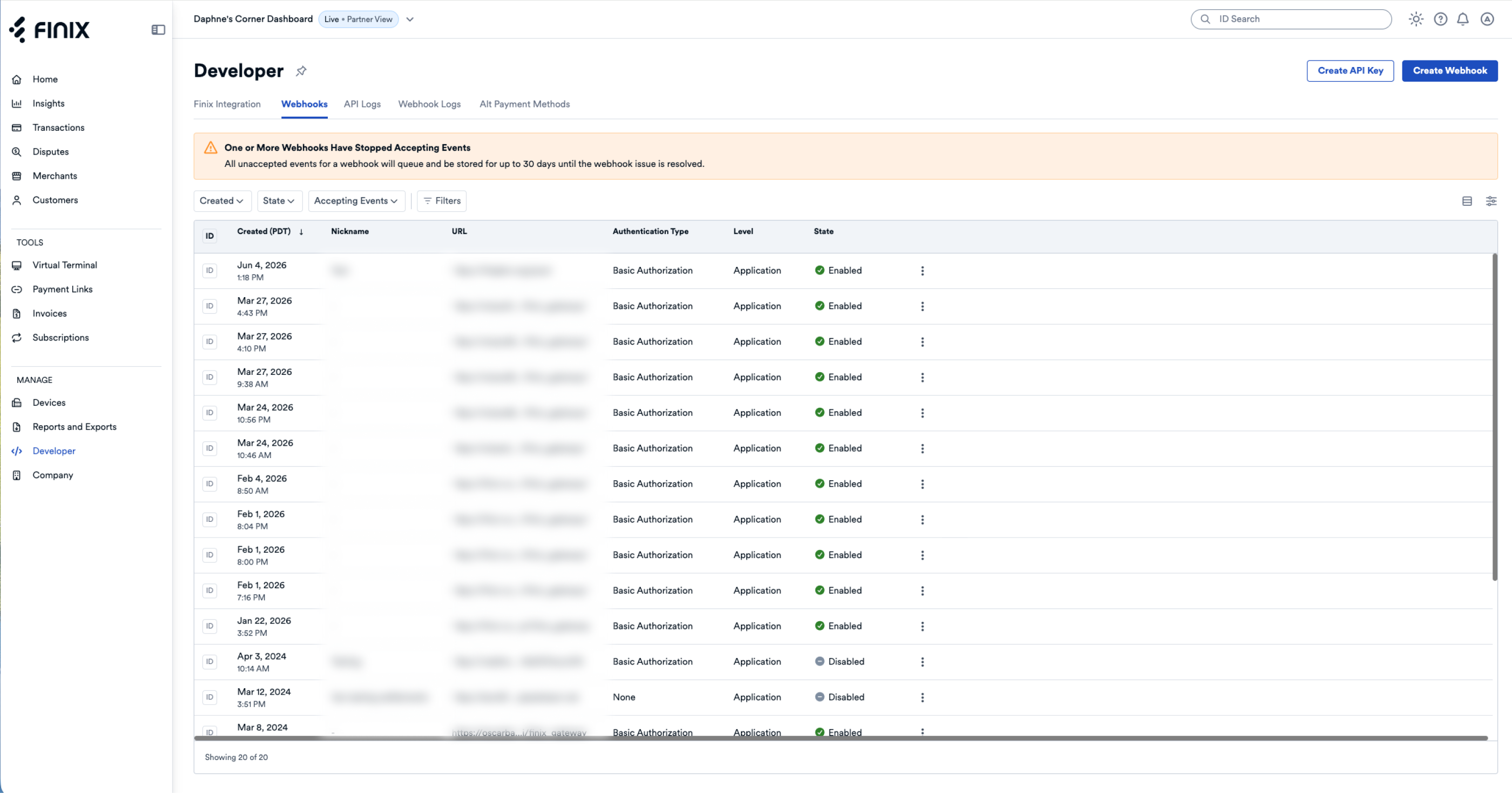
Finix also supports creating and updating webhooks through the Finix Dashboard. The dashboard provides the same webhook configuration options as you get via API:
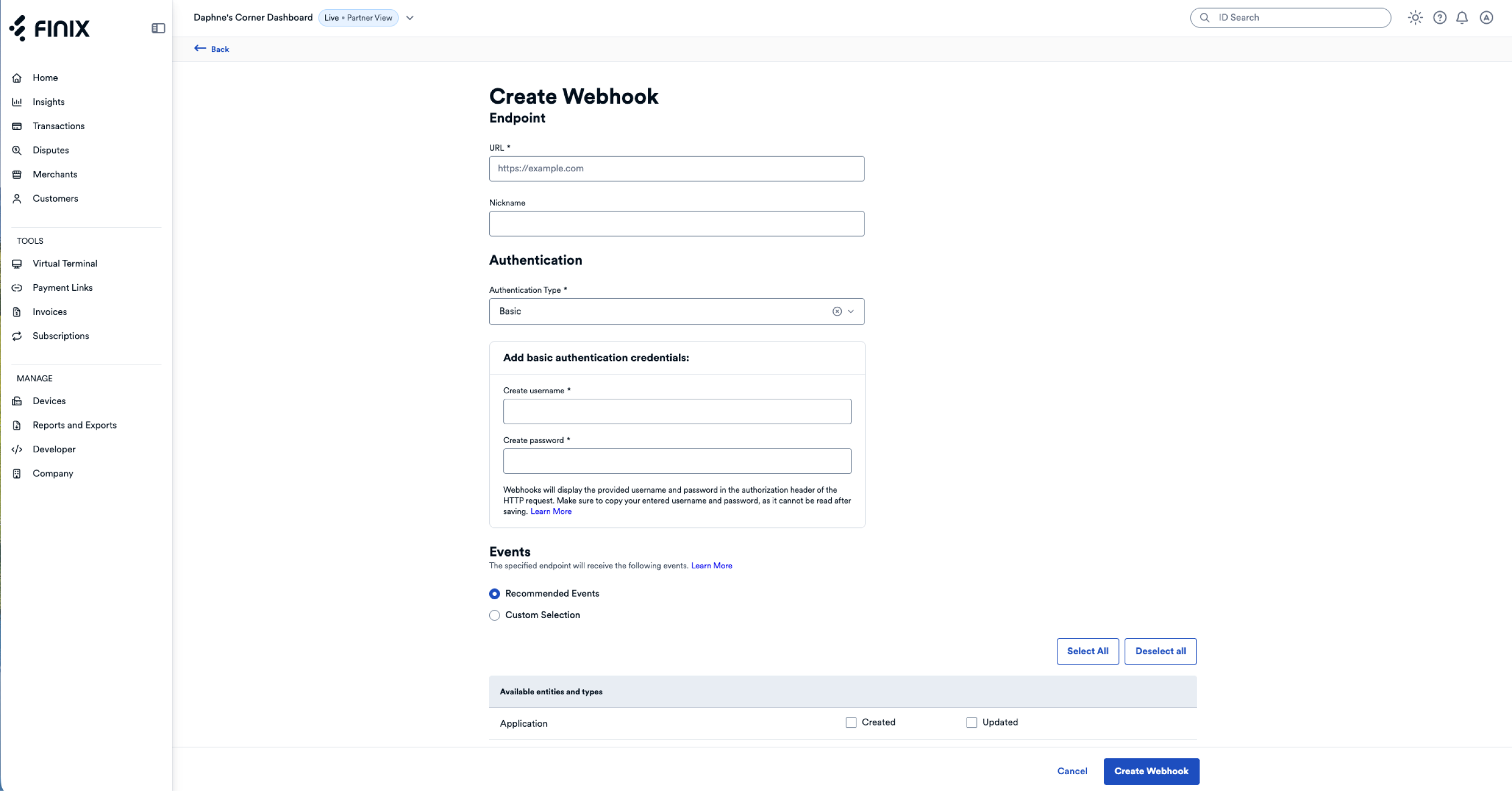
- Set URL - Set the URL you'd like Finix to send webhooks to.
- Set Authentication - Choose Basic or Bearer authentication (recommended), or no authentication.
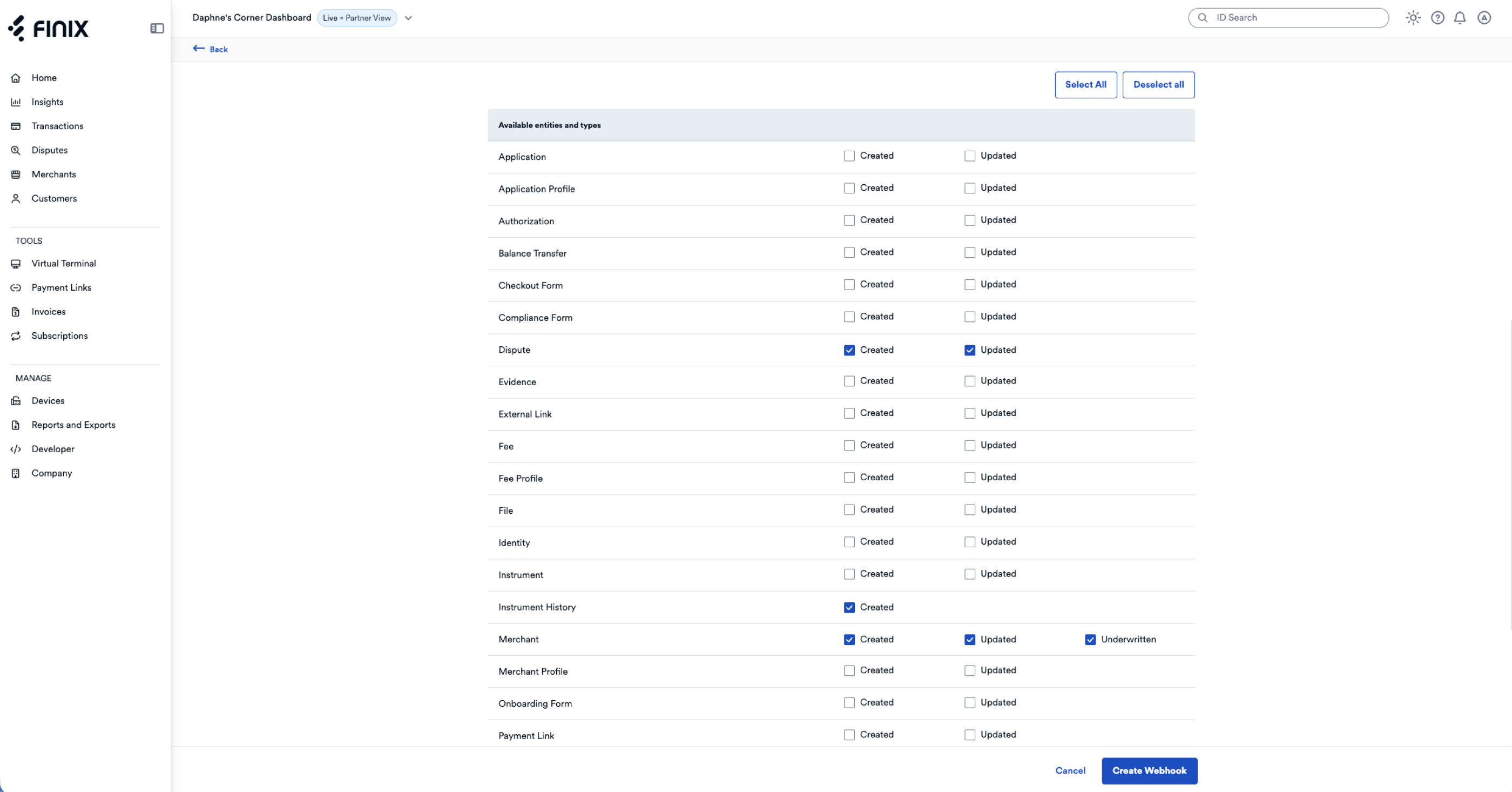
- Filter Events - Subscribe to all events, or choose the specific events you'd like to subscribe to.
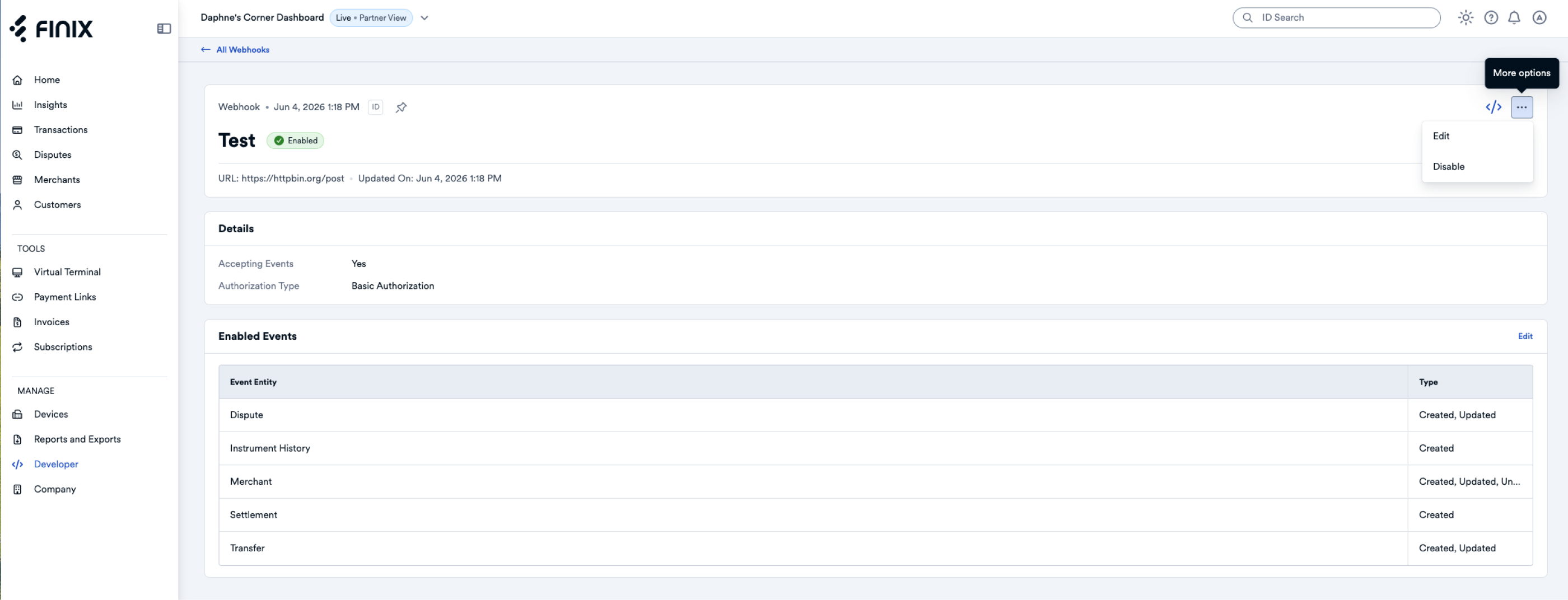
- Update Webhooks - Update existing webhooks (e.g., change the URL or events).
- Disable Webhooks - Disable existing webhooks you no longer use.
To create or update webhooks in the dashboard, navigate to Developer > Webhooks. There, you will see a list of all webhooks you have created. You will be able to create new webhooks as well as update existing ones.
Click Create Webhook to create a new webhook. You'll set the URL, Authentication Type, and Events you'd like to subscribe to. For the full list of events, see Webhook Events or create your own webhook with the dashboard.
Under Developer > Webhooks, navigate to one of your webhook events to view it's current settings. On that page, you can also Edit or Disable the webhook (for example, to update the events the webhook subscribes to).
Finix lets you create and update webhooks with Finix's API. This can be helpful for companies that want to manage webhook through their own dashboard or developer tools.
When you create a webhook via API, Finix will send an empty test event to the endpoint URL configured in the webhook. The configured URL must respond to this event successfully to let Finix know the URL is valid, at which point Finix will enable the webhook. See Validating Webhooks for more information.
For most integrations, you should create authenticated webhooks instead. Authentication adds an Authorization header that your server validates on every event, and combined with verifying the Finix-Signature header, it gives you a layered way to confirm events are coming from Finix.
Use unauthenticated webhooks only for testing your integration in Sandbox. In production, always set an authentication type so your server can verify inbound events.
To create a webhook with no authentication, send a POST request to Finix's /webhooks endpoint with just the URL.
curl "https://finix.sandbox-payments-api.com/webhooks" \
    -u USsRhsHYZGBPnQw8CByJyEQW:8a14c2f9-d94b-4c72-8f5c-a62908e5b30e \
    -H 'Accept: application/hal+json' \
    -H 'Content-Type: application/json' \
    -H 'Finix-Version: 2022-02-01' \
    -X POST \
    -d '{
        "url": "https://webhook.site/73b2d0d3-8cc3-4003-857d-2e3a137887ce"
}'{
"id": "WHid2GDsvQaHhnLQa1HCjNiR",
"created_at": "2024-12-31T15:11:43.41Z",
"updated_at": "2024-12-31T15:11:43.41Z",
"application": "APgPDQrLD52TYvqazjHJJchM",
"authentication": {
"type": "NONE"
},
"enabled": true,
"enabled_events": [],
"is_accepting_events": true,
"nickname": null,
"previous_secret_expires_at": null,
"secret_signing_key": "1676b0aa7f96e7f2cb3ef92ea266a13a534ad06593e930152343a36d14bdc3c5",
"url": "https://webhook.site/************************************",
"_links": {
"self": {
"href": "https://finix.sandbox-payments-api.com/webhooks/WHid2GDsvQaHhnLQa1HCjNiR"
},
"application": {
"href": "https://finix.sandbox-payments-api.com/applications/APgPDQrLD52TYvqazjHJJchM"
}
}
}When creating a webhook, specify the authentication type (authentication.type) that Finix should use when sending events to the endpoint URL. When you add an authentication type, Finix will add an Authorization header to events sent to the configured endpoint URL. Your server can use the Authorization header to verify that the event came from Finix.
There are two sets of credentials at play when you create an authenticated webhook; do not mix them up:
- Your Finix API credentials authenticate the
POST /webhooksrequest to Finix. These go in the-uflag (or your client's auth config), and are the same credentials you use for any other Finix API call. - The credentials you set on the
authenticationfield of the request body are values Finix sends to your server on every event delivery. Pick values your own webhook receiver knows how to validate.
The username/password under authentication.basic and the token under authentication.bearer are credentials your own server validates on incoming webhook events. Do not paste your Finix API key/secret here. If you reuse your Finix credentials, your receiver will be checking against the wrong values, and anyone who learns your webhook auth would also have your Finix API access.
Finix supports two authentication types:
- Basic Authentication: Finix will send the webhook event with Basic Authentication.
- Bearer Token Authentication: Finix will send the webhook with a Bearer Token.
Finix uses the standard Basic authentication format. When you set authentication.type to BASIC, each webhook event is sent with an Authorization header formatted as Authorization: Basic <Base64>.
Choose the username and password your webhook receiver expects to validate, and put them in authentication.basic. These are credentials Finix will send to your server on every event; they are not your Finix API credentials. In the example below, the placeholder values your-webhook-user and your-webhook-password should be replaced with values you control.
curl "https://finix.sandbox-payments-api.com/webhooks" \
    -u USsRhsHYZGBPnQw8CByJyEQW:8a14c2f9-d94b-4c72-8f5c-a62908e5b30e \
    -H 'Accept: application/hal+json' \
    -H 'Content-Type: application/json' \
    -H 'Finix-Version: 2022-02-01' \
    -X POST \
    -d '{
        "authentication": {
            "type": "BASIC",
            "basic": {
                "username": "your-webhook-user",
                "password": "your-webhook-password"
            }
        },
        "url": "https://webhook.site/73b2d0d3-8cc3-4003-857d-2e3a137887ce"
    }'
In the request above, the -u flag is your Finix API credentials (used to authenticate this call to Finix). The values inside authentication.basic are credentials of your choosing that Finix will send to your webhook URL.
To create the Authorization header included in events sent to that URL, Finix:
- Combines the
usernameandpasswordwith a colon
(e.g.,your-webhook-user:your-webhook-password) - Base64-encodes the string
(e.g.,eW91ci13ZWJob29rLXVzZXI6eW91ci13ZWJob29rLXBhc3N3b3Jk) - Adds the value to the Authorization Header with the Basic scheme
(e.g.,Authorization: Basic eW91ci13ZWJob29rLXVzZXI6eW91ci13ZWJob29rLXBhc3N3b3Jk)
Finix supports sending OAuth 2.0 Bearer Tokens RFC 6750. These are opaque strings that it is up to your server to interpret. When you set authentication.type to BEARER, each webhook event is sent with an Authorization header formatted as Authorization: Bearer <your-token>.
The token you put in authentication.bearer is a value you choose that your webhook receiver validates; it is not a Finix API credential. Finix sends the token to your URL exactly as you provided it, and any further validation is up to your system.
curl "https://finix.sandbox-payments-api.com/webhooks" \
    -u USsRhsHYZGBPnQw8CByJyEQW:8a14c2f9-d94b-4c72-8f5c-a62908e5b30e \
    -H 'Accept: application/hal+json' \
    -H 'Content-Type: application/json' \
    -H 'Finix-Version: 2022-02-01' \
    -X POST \
    -d '{
        "authentication": {
            "type": "BEARER",
            "bearer": {
                "token": "U3VwZXIgc2VjcmV0IGVuY29kZWQgdG9rZW4="
            }
        },
        "url": "https://webhook.site/73b2d0d3-8cc3-4003-857d-2e3a137887ce"
    }'
From this example, your server will receive events with the header authorization: Bearer U3VwZXIgc2VjcmV0IGVuY29kZWQgdG9rZW4=.
Along with optional Authorization headers, every webhook event from Finix includes a Finix-Signature header that lets you verify the payload wasn’t tampered with and was sent recently.
- Header name:
Finix-Signature - Format:
timestamp=<epoch-second>, sig=<hex-encoded-hmac> - Algorithm: HMAC-SHA256 over the bytes of the string
"<timestamp>:<raw_body>" - Output encoding: lowercase hex
Example:
- Finix-Signature:
timestamp=1764948460, sig=0f0250ab7266dbe7a4d4cf7a502c9df1e76683cc739de289e30d0cc01bb8efd5
When you create a webhook, the API response includes a signing key you’ll use to validate future events:
- Example signing key:
a1fc2b789d958e8a9a3517c9c8b129d5c2cecedfc68788345aaf9a5b2a859976
- Finix takes the Unix epoch second from the header (the
timestampvalue). - It builds a string as:
timestamp:bodywherebodyis the exact webhook request body as a string (including whitespace and line breaks, exactly as delivered). - It computes an HMAC-SHA256 over that string using the signing key. The signing key is used as a UTF‑8 string (not hex‑decoded).
- Read the
Finix-Signatureheader from the request. - Parse out:
timestamp(as a number of seconds since Unix epoch)sig(the hex-encoded signature)
- Ensure the timestamp is recent (for example, within 5 minutes/300 seconds) to protect against replay attacks.
- Recompute the HMAC-SHA256 of
timestamp:bodyusing the webhook’s signing key (as a UTF‑8 string). Consider the validation successful if any provided signature exactly matches your computed value (case-insensitive compare or normalize to lowercase). Use a constant-time comparison if available.
The following JSON is a webhook body. If this were the body received, it must be used verbatim when recomputing the signature.
{
  "id": "event_7eAz5GUWUGa9sGcToi1Xk3",
  "system_generated_idempotency_id": "7eAz5GUWUGa9sGcToi1Xk3",
  "type": "created",
  "entity": "application_profile",
  "occurred_at": "2025-12-05T15:27:40.285921482",
  "_embedded": {
    "application_profiles": [
      {
        "id": "PP8P6TKwhQFFTz7MMqskzTJn",
        "created_at": "2025-12-05T15:27:39.86Z",
        "updated_at": "2025-12-05T15:27:39.86Z",
        "application": "AP9X9xQrii84kQC5xZaaqRdL",
        "card_present_fee_profile": null,
        "fee_profile": null,
        "risk_profile": "RPpCkzumM6AYti5pTHsV6xpp",
        "tags": {}
      }
    ]
  }
}The example below shows how to recompute and compare the signature using common tools available on macOS/Linux. It treats the signing key as a plain UTF‑8 string (not hex‑decoded) to match Finix’s signing method.
# 1) Initial setup
# Example webhook header:
FINIX_SIGNATURE_HEADER='timestamp=1764948460, sig=0f0250ab7266dbe7a4d4cf7a502c9df1e76683cc739de289e30d0cc01bb8efd5'
# From the /webhooks API response:
SIGNING_KEY='a1fc2b789d958e8a9a3517c9c8b129d5c2cecedfc68788345aaf9a5b2a859976'

# Use the actual webhook body (exact bytes, verbatim). Example:
BODY='{
  "id" : "event_7eAz5GUWUGa9sGcToi1Xk3",
  "system_generated_idempotency_id" : "7eAz5GUWUGa9sGcToi1Xk3",
  "type" : "created",
  "entity" : "application_profile",
  "occurred_at" : "2025-12-05T15:27:40.285921482",
  "_embedded" : {
    "application_profiles" : [ {
      "id" : "PP8P6TKwhQFFTz7MMqskzTJn",
      "created_at" : "2025-12-05T15:27:39.86Z",
      "updated_at" : "2025-12-05T15:27:39.86Z",
      "application" : "AP9X9xQrii84kQC5xZaaqRdL",
      "card_present_fee_profile" : null,
      "fee_profile" : null,
      "risk_profile" : "RPpCkzumM6AYti5pTHsV6xpp",
      "tags" : { }
    } ]
  }
}'

# 2) Extract timestamp and signature from the header
TS=$(printf "%s" "$FINIX_SIGNATURE_HEADER" | sed -n 's/.*timestamp=\([0-9]*\).*/\1/p')
SIG=$(printf "%s" "$FINIX_SIGNATURE_HEADER" | sed -n 's/.*sig=\([^,]*\).*/\1/p' | tr 'A-F' 'a-f')

# 3) Recompute HMAC-SHA256 over "timestamp:body" using the signing key as UTF-8 text
# Avoid adding extra newlines. We write timestamp, a colon, then the raw body bytes.
COMPUTED_SIG=$( { printf "%s:" "$TS"; printf "%s" "$BODY"; } \
  | openssl dgst -sha256 -mac HMAC -macopt key:"$SIGNING_KEY" -binary \
  | xxd -p -c 256 )

printf "Header sig:   %s\n" "$SIG"
printf "Computed sig: %s\n" "$COMPUTED_SIG"

if [ "$SIG" = "$COMPUTED_SIG" ]; then
  echo "Signature is valid"
else
  echo "Signature is INVALID"
fi
Notes
- Use the body exactly as received. Any change in whitespace, ordering, or encoding will change the signature.
- The signing key should be stored securely.
- The comparison above normalizes the header signature to lowercase hex for consistency.
When configuring webhooks, customers typically subscribe to event types they are interested in and ignore those they are not. By default, newly created webhooks subscribe to a subset of events of interest to many users, such as Transfer creation and updates.
Finix supports subscribing to specific webhook events through the webhook's enabled_events field to filter events sent to your webhook server. You can provide enabled_events when creating or updating a webhook to override the default events.
See Webhook Events for the complete list of events you can subscribe to.
In this example, we'll update an existing webhook to enable more events of interest.
curl -i -X PUT \
  -u USfdccsr1Z5iVbXDyYt7hjZZ:313636f3-fac2-45a7-bff7-a334b93e7bda \
  https://finix.sandbox-payments-api.com/webhooks/WHhEyB1GdW8NsP2T7Rv6nfc6 \
  -H 'Content-Type: application/json' \
  -d '{
  "enabled_events": [
    {
      "entity": "authorization",
      "types": [
        "created",
        "updated"
      ]
    },
    {
      "entity": "balance_transfer",
      "types": [
        "created",
        "updated"
      ]
    },
    {
      "entity": "evidence",
      "types": [
        "created"
      ]
    },
    {
      "entity": "gateway_integration",
      "types": [
        "created"
      ]
    },
    {
      "entity": "merchant",
      "types": [
        "created",
        "updated"
      ]
    },
    {
      "entity": "onboarding_form",
      "types": [
        "created",
        "updated"
      ]
    },
    {
      "entity": "transfer_attempt",
      "types": [
        "created"
      ]
    },
    {
      "entity": "verification",
      "types": [
        "created",
        "updated"
      ]
    }
  ]
}'{
"id": "WHhEyB1GdW8NsP2T7Rv6nfc6",
"created_at": "2024-12-30T14:01:12.22Z",
"updated_at": "2026-05-18T14:42:42.85Z",
"application": "APc9vhYcPsRuTSpKD9KpMtPe",
"authentication": {
"type": "BASIC"
},
"enabled": true,
"enabled_events": [
{
"entity": "authorization",
"types": ["created", "updated"]
},
{
"entity": "balance_transfer",
"types": ["created", "updated"]
},
{
"entity": "evidence",
"types": ["created"]
},
{
"entity": "gateway_integration",
"types": ["created"]
},
{
"entity": "merchant",
"types": ["created", "updated"]
},
{
"entity": "onboarding_form",
"types": ["created", "updated"]
},
{
"entity": "transfer_attempt",
"types": ["created"]
},
{
"entity": "verification",
"types": ["created", "updated"]
}
],
"is_accepting_events": true,
"nickname": null,
"previous_secret_expires_at": null,
"url": "https://eohzjuj2prziycz.m.pipedream.net",
"_links": {
"self": {
"href": "https://finix.sandbox-payments-api.com/webhooks/WHhEyB1GdW8NsP2T7Rv6nfc6"
},
"application": {
"href": "https://finix.sandbox-payments-api.com/applications/APc9vhYcPsRuTSpKD9KpMtPe"
}
}
}When you create a webhook via API, Finix will send an empty test event to the endpoint URL configured in the webhook. The configured URL must respond to this event successfully to let Finix know the URL is valid, at which point Finix will enable the webhook.
If your URL does not respond to the event successfully, Finix will synchronously respond to your webhook creation request with an error.
{
  "total": 1,
  "_embedded": {
    "errors": [
      {
        "logref": "b3abf6fae189d7ce",
        "message": "Failed to create webhook. Unable to call the configured URL with an empty payload. Received Response Code: {404}",
        "code": "INVALID_FIELD",
        "_links": {
          "self": {
            "href": "https://finix.sandbox-payments-api.com/notification/webhooks"
          }
        }
      }
    ]
  }
}You can disable existing webhooks by setting enabled: false in PUT requests.
curl "https://finix.sandbox-payments-api.com/webhooks/WHLvrRTUcHYReDCMuuvKLxj" \
    -H "Content-Type: application/json" \
    -H 'Finix-Version: 2022-02-01' \
    -u  USsRhsHYZGBPnQw8CByJyEQW:8a14c2f9-d94b-4c72-8f5c-a62908e5b30e \
    -X PUT \
    -d '{
        "enabled": false
}'When a webhook delivery fails, Finix retries the event up to 10 times using exponential backoff. Any 2xx HTTP status code counts as a successful delivery and stops further retries.
A delivery is considered failed when your endpoint returns a non-2xx status code or does not respond.
If an endpoint URL hasn't accepted any events or responded with a successful 2xx HTTP status code for an extended period, Finix may disable the webhook. In Sandbox, Finix will disable failing webhooks and reach out to you about how the webhook is configured. In live environments, Finix will contact you before disabling a webhook.
Delays between retries increase exponentially, up to a maximum of 15 minutes. Approximate times are listed below; actual delays include a small amount of jitter.
| Retry | Approximate Delay |
|---|---|
| 1 | 1 minute |
| 2 | 1.5 minutes |
| 3 | 2 minutes |
| 4 | 3 minutes |
| 5 | 5 minutes |
| 6 | 9 minutes |
| 7 | 15 minutes |
| 8 | 15 minutes |
| 9 | 15 minutes |
| 10 | 15 minutes |
For example, if the initial delivery fails at 2:00 PM:
- Retry 1 at ~2:01 PM (1 minute later)
- Retry 2 at ~2:02:30 PM (1.5 minutes later)
- Retry 3 at ~2:04:30 PM (2 minutes later)
This continues up to 10 retries. Once all retry attempts are exhausted, the event cannot be resent. If you suspect you missed events, use the Finix API to query the relevant resources directly.
Yes, the Finix Dashboard offers a Webhooks Log that lists all the webhook events Finix has sent in the past 30 days. For more information, see Webhook Logs.
Yes, the Finix dashboard lets you view, create, update, and disable webhooks. For more information, see Managing Webhooks via Dashboard.
You will receive a request for each individual event. Webhooks created at the Application level receive any state change under an Application. These changes include a change in state for a Transfer, Merchant account provisioning, and Disputes.
An event gets sent any time a state change occurs in our database; this helps make webhook events as real-time as possible.
Any 2xx HTTP code will let Finix know the event got successfully received.
Yes. If your endpoint doesn't respond or returns a non-2xx status code, Finix automatically retries up to 10 times. See Delivery Attempts and Retries for the full schedule. Once all retries are exhausted, the event will not be resent automatically. If you suspect you missed events, you can query the relevant resources directly via the Finix API to reconcile your state.
Is Finix sending any confidential information? i’d like to know if using a public service, like https://pipedream.com, is an option to test webhooks
Yes, you can use public services like https://pipedream.com to test webhooks. We won’t ever send sensitive credit card data, but will return less sensitive PII such as birthdates and addresses. For additional details on the specific data sent back, you can review our list of sample webhook events.
Yes, see Webhook Events to view the full list of webhook events Finix offers.
Occasionally Finix will release new events to ensure devs can receive alerts about any corner of our API. Webhooks subscribed to All Events automatically get subscribed to these new events.
See Webhook Events to view the full list of webhook events Finix offers.
Every event your Webhook URL receives includes a unique event#id, which you can use to verify none of the events are duplicates.
{
  "id": "event_cgGzzdKrV3fbsd74ugymaX",
  "type": "updated",
  "entity": "transfer",
  "occurred_at": "2023-01-05T21:58:48.022174",
  "_embedded": {
    "transfers": [
      {
        "fee": 0,
        "destination": null,
        "created_at": "2023-01-05T21:58:27.26Z",
        "failure_message": null,
        "source": "PI6fBxWjm2GfdhCughovSWQr",
        "type": "DEBIT",
        "additional_buyer_charges": null,
        "statement_descriptor": "FNX*FINIX FLOWERS",
        "additional_healthcare_data": null,
        "updated_at": "2023-01-05T21:58:28.21Z",
        "subtype": "API",
        "amount_requested": 662154,
        "currency": "USD",
        "id": "TR3CpnVVxM1iapJgxdyb5Hsz",
        "state": "SUCCEEDED",
        "idempotency_id": null,
        "amount": 662154,
        "failure_code": null,
        "trace_id": "97083fa0-712f-489d-bf38-bda18825f966",
        "address_verification": null,
        "security_code_verification": null,
        "raw": null,
        "merchant": "MU7cXuKj2xx41hhZZi6bZ13A",
        "merchant_identity": "IDvHGrfeVmB3i7uL78xjemNk",
        "tags": {},
        "ready_to_settle_at": null,
        "application": "APgPDQrLD52TYvqazjHJJchM",
        "externally_funded": "UNKNOWN",
        "messages": []
      }
    ]
  }
}Use the resource ID’s in each response to consolidate events. For example:
We submit requests from multiple IP addresses.
Authenticate your webhooks so events include an authorization header. Refer to the authorization header to confirm that events are from Finix. You should also verify the Finix-Signature header on every event.
There shouldn’t be any delay. To prevent migration issues, you can enable multiple at the same time. You can immediately deactivate the old endpoint URL and disable the old webhook.
Finix retries failed webhook events up to 10 times with exponential backoff. If your server is unavailable or continues to return non-2xx responses after all retry attempts, Finix will stop trying to deliver that event.
For more details, see Delivery Attempts and Retries.
The events you receive depend on the credentials used to create the Webhook:
ROLE_PLATFORMcredentials receive every webhook event sent to onboardedApplications.ROLE_PARTNERcredentials only receive the webhook events related to theApplicationthe credentials were created under.
To change how many events you receive, you can either:
- Create a new
Webhookusing the necessary credential level. - Use Webhook Event Filtering to filter out unnecessary events.