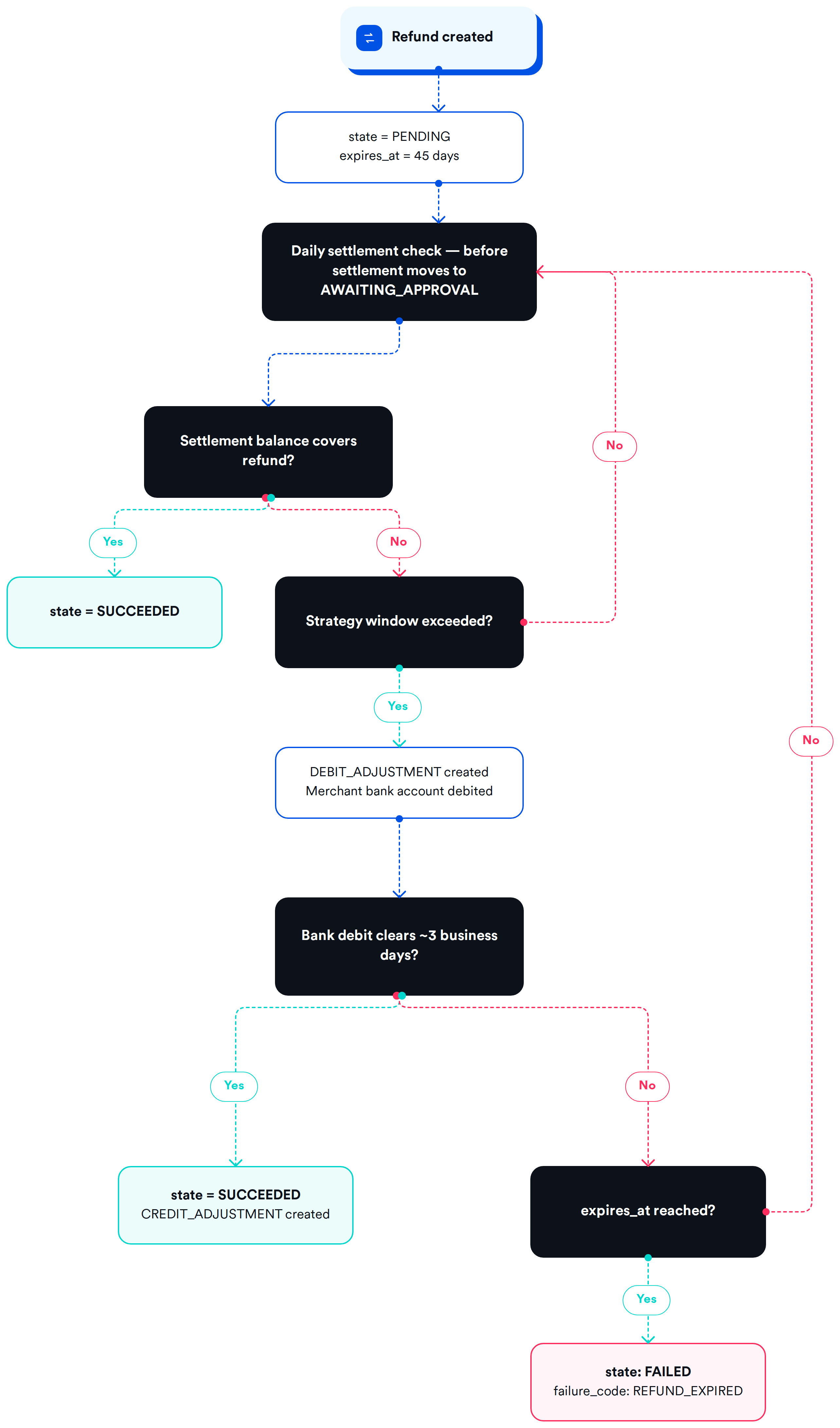
We've updated how refunds are submitted so that there are sufficient funds in your settlement to cover them. For merchants with a pending-refunds strategy enabled, Finix now holds refunds in a temporary PENDING state while it verifies that the settlement balance can cover the amount.
Previously, refunds for these merchants were submitted immediately. If a settlement did not have enough sales to cover a refund, you were debited for the difference.
- Daily settlement checks: Before your daily settlement is approved, Finix checks pending refunds in the order they were created. If your settlement balance covers a refund, Finix submits it and updates it to
SUCCEEDED. - Bank debit after 7 days: If your daily sales do not cover a pending refund after 7 calendar days, Finix automatically debits the linked bank account for the amount. Once the debit clears, typically within 3 business days, Finix submits the refund.
- Expiration after 45 days: A refund can stay in
PENDINGfor up to 45 days. If it cannot be funded by the settlement balance or a bank debit in that time, the refund moves toFAILEDwith the failure codeREFUND_EXPIRED.
- Review your API integration and webhooks: Refunds can now return
state: PENDING. Update any logic that expects a refund to succeed or fail immediately. - Test in Sandbox: You can test the full pending refund flow in your Sandbox environment.
If you have questions, reach out to your Customer Delivery Manager or email support@finix.com.
To learn more, see the Pending refunds guide.