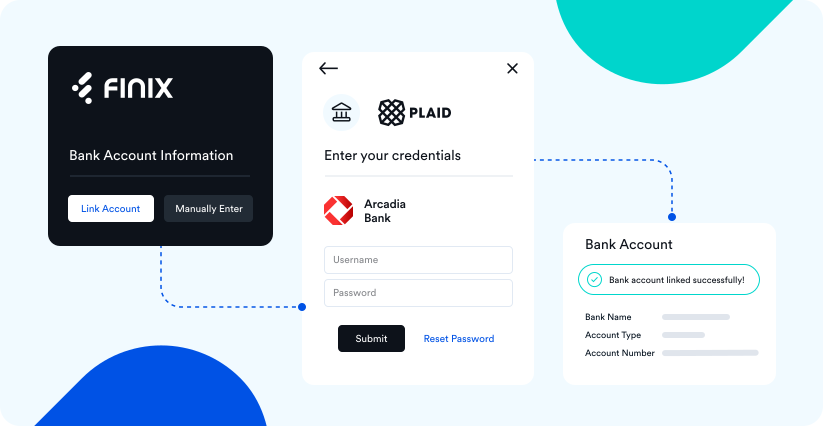
Finix and Plaid have partnered to let you add your customers' bank accounts to Finix's platform seamlessly and securely. Plaid instantly verifies bank account existence and ownership, providing a fast and secure way to board your customers onto Finix.
Finix offers multiple ways to add bank accounts with Plaid:
- Add bank accounts with an existing Plaid Account
- Use Finix's Hosted Onboarding Forms for sellers, which have Plaid Link embedded by default
You can use Finix payment_instruments connected and verified with Plaid for:
- ACH Direct Debits: debit buyer bank accounts for goods and services
- Bank Payouts: send money to recipients
- Onboarding Sellers and Recipients: onboard sellers and recipients with our APIs or onboarding forms
This guide explains how Plaid fits into those Finix use cases. Once you have a specific use case in mind, please refer to its respective guide to understand its full process (for example, how to onboard a seller).
This section of the guide is for Finix customers who have existing Plaid accounts and want to use Finix for one of the payments use cases above. If you do not have a Plaid account and would like a referral to Plaid, please email sales@finix.com. A Finix Sales Representative will assist you.
The first step is embedding Plaid Link into your application. Link is a client-side experience that lets your customers connect their bank accounts securely through Plaid. After Link, you can use your customers' bank account connections to create Plaid processor_tokens and, ultimately, Finix payment_instruments.
To guide your integration, we recommend familiarizing yourself with Plaid's guide to the Plaid + Finix integration. Plaid's guide has information on how to embed Plaid Link into your application and create Plaid processor_tokens.
Finix uses Plaid's Auth and Identity endpoints to tokenize Payment Instruments from Plaid tokens. You must include both auth and identity in the Plaid Link Token products array.
With Plaid Link embedded into your application, you can exchange your customers' Plaid access_tokens for processor_tokens with processor: finix. Finix uses processor_tokens to get and save your customers' bank account details in the next step.
curl "https://sandbox.plaid.com/processor/token/create" \
    -H 'Content-Type: application/json' \
    -X POST \
    -d '{
        "client_id": "${PLAID_CLIENT_ID}",
        "secret": "${PLAID_SECRET}",
        "access_token": "${ACCESS_TOKEN}",
        "account_id": "${ACCOUNT_ID}",
        "processor": "finix"
}'{
"processor_token": "processor-sandbox-0asd1-a92nc",
"request_id": "kxiMB5rN03wiLMD"
}Now, you can use the Plaid processor_token to create a Finix payment_instrument:
- Sandbox serverhttps://finix.sandbox-payments-api.com/payment_instruments
curl -i -X POST \
  -u USfdccsr1Z5iVbXDyYt7hjZZ:313636f3-fac2-45a7-bff7-a334b93e7bda \
  https://finix.sandbox-payments-api.com/payment_instruments \
  -H 'Content-Type: application/json' \
  -H 'Finix-Version: 2022-02-01' \
  -d '{
    "identity": "ID3YZagNmW2bXhJkA6RdUkdS",
    "name": "John Smith",
    "third_party": "PLAID",
    "third_party_token": "processor-sandbox-ab3cff03-8948-1291-f2fe-05634be2c38c",
    "type": "BANK_ACCOUNT"
}'{
"id": "PI9RvCXMLzSHkQpUWxX7dgY4",
"created_at": "2026-09-25T20:36:43.89Z",
"updated_at": "2026-09-25T20:36:43.89Z",
"application": "APc9vhYcPsRuTSpKD9KpMtPe",
"created_via": "API",
"currency": "USD",
"disabled_code": null,
"disabled_message": null,
"enabled": true,
"fingerprint": "FPRxAutj19xH1AH6ykGx2dwa7",
"identity": "ID3YZagNmW2bXhJkA6RdUkdS",
"instrument_type": "BANK_ACCOUNT",
"account_type": "CHECKING",
"bank_account_validation_check": "VALID",
"bank_code": "011401533",
"country": "USA",
"institution_number": null,
"masked_account_number": "XXXXXXXXXXX0000",
"name": "John Smith",
"transit_number": null,
"tags": {},
"third_party": "PLAID",
"third_party_token": "processor-sandbox-ab3cff03-8948-1291-f2fe-05634be2c38c",
"type": "BANK_ACCOUNT",
"_links": {
"self": {
"href": "https://finix.sandbox-payments-api.com/payment_instruments/PI9RvCXMLzSHkQpUWxX7dgY4"
},
"authorizations": {
"href": "https://finix.sandbox-payments-api.com/payment_instruments/PI9RvCXMLzSHkQpUWxX7dgY4/authorizations"
},
"transfers": {
"href": "https://finix.sandbox-payments-api.com/payment_instruments/PI9RvCXMLzSHkQpUWxX7dgY4/transfers"
},
"verifications": {
"href": "https://finix.sandbox-payments-api.com/payment_instruments/PI9RvCXMLzSHkQpUWxX7dgY4/verifications"
},
"application": {
"href": "https://finix.sandbox-payments-api.com/applications/APc9vhYcPsRuTSpKD9KpMtPe"
},
"identity": {
"href": "https://finix.sandbox-payments-api.com/identities/ID3YZagNmW2bXhJkA6RdUkdS"
}
}
}This diagram summarizes that process across the Plaid and Finix platforms:
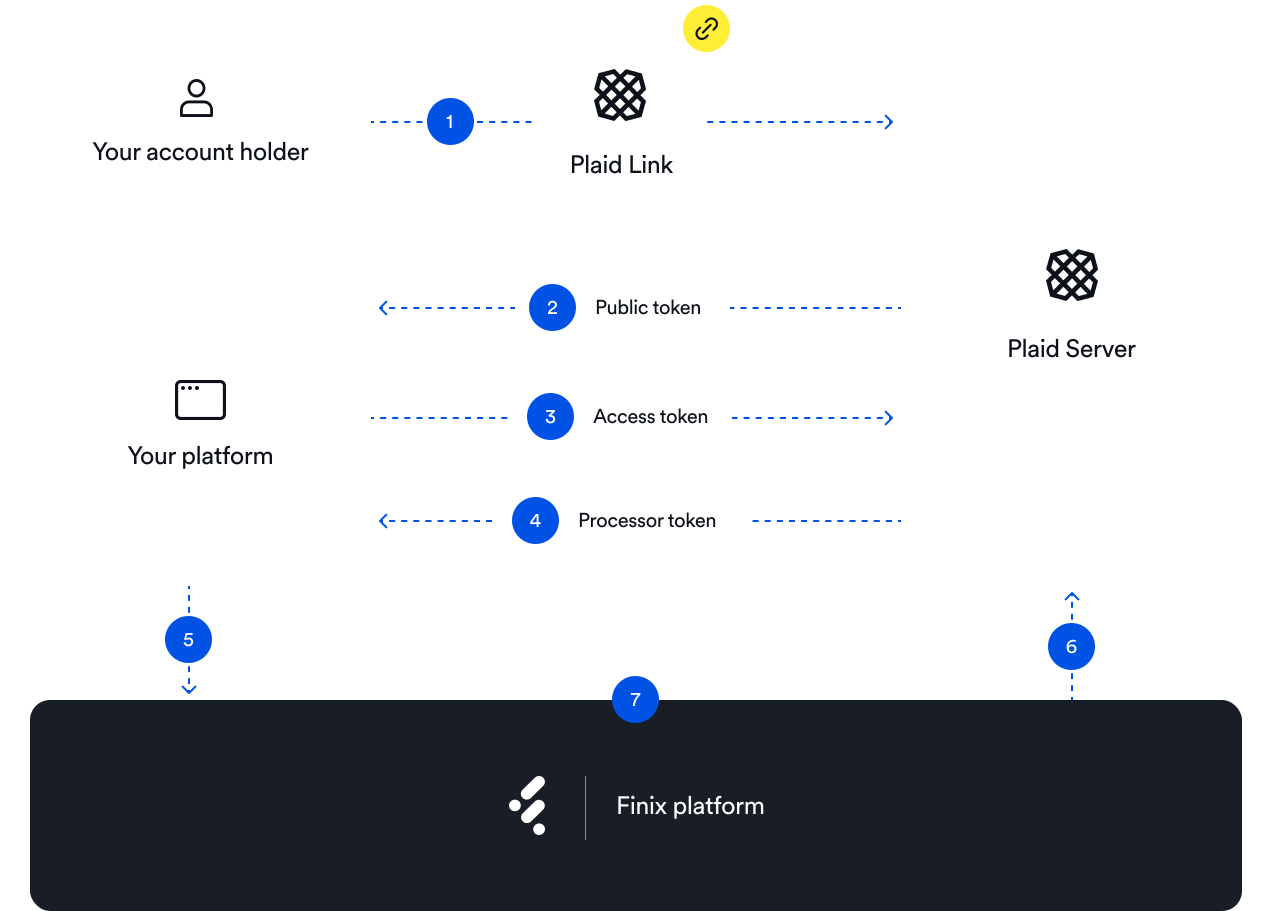
If you have previously connected your customers' bank accounts with Plaid, you can migrate those bank account connections onto Finix's platform. To do this, you will need to use Plaid's /processor/token/create endpoint to exchange each customer's Plaid access_token for a processor_token with processor: finix.
For more information on creating the processor_token, please see Plaid's guide to the Plaid + Finix integration.
By default our Finix.js JavaScript library creates Bank Accounts using Plaid. All you need to do is implement Finix.js and Finix handles the heavy lifting of using Plaid.
Your responsibility will be claiming the TOKEN generated by Finix.js with your authenticated credentials in the Step 2 below.
Our Finix.js library automatically enables Plaid for all BANK_ACCOUNT creation. This is to minimize returns and fraud.
You will get a TOKEN back from the finix.js.
{
  "id": "TKeD6uad8xZc52Rqg1VhvSBw",
  "created_at": "2025-06-10T00:31:53.54Z",
  "updated_at": "2025-06-10T00:31:53.54Z",
  "currency": "USD",
  "expires_at": "2025-06-11T00:31:53.54Z",
  "fingerprint": "FPRrcobjtdU98gr4sjiqYR1Qg",
  "instrument_type": "BANK_ACCOUNT"
}
Once you've handled the response, store the ID to utilize the token in the future. You will eventually send the token ID from your front-end client to your back-end server.
    const tokenData = res.data || {};     // get token ID from response
    const token = tokenData.id;
    function handleResponse(response) // This would be your custom logic
Many customers implement additional logic after a buyer enters their payment information, using the returned token. For example, some customers choose to implement a different workflow depending if a PAYMENT_CARD or BANK_ACCOUNT is returned by Finix.js.
Now that you have the token, you should send this to your backend. You will need this ID to eventually do an authenticated call to Finix in the next step.
Tokens should be used to create a Payment Instrument right away in the next step. Tokens expire within 30 minutes and cannot be used after expiring.
fetch('/your/backend', {
  method: 'POST',
  headers: { 'Content-Type': 'application/json' },
  body: JSON.stringify({ token: token }),
})
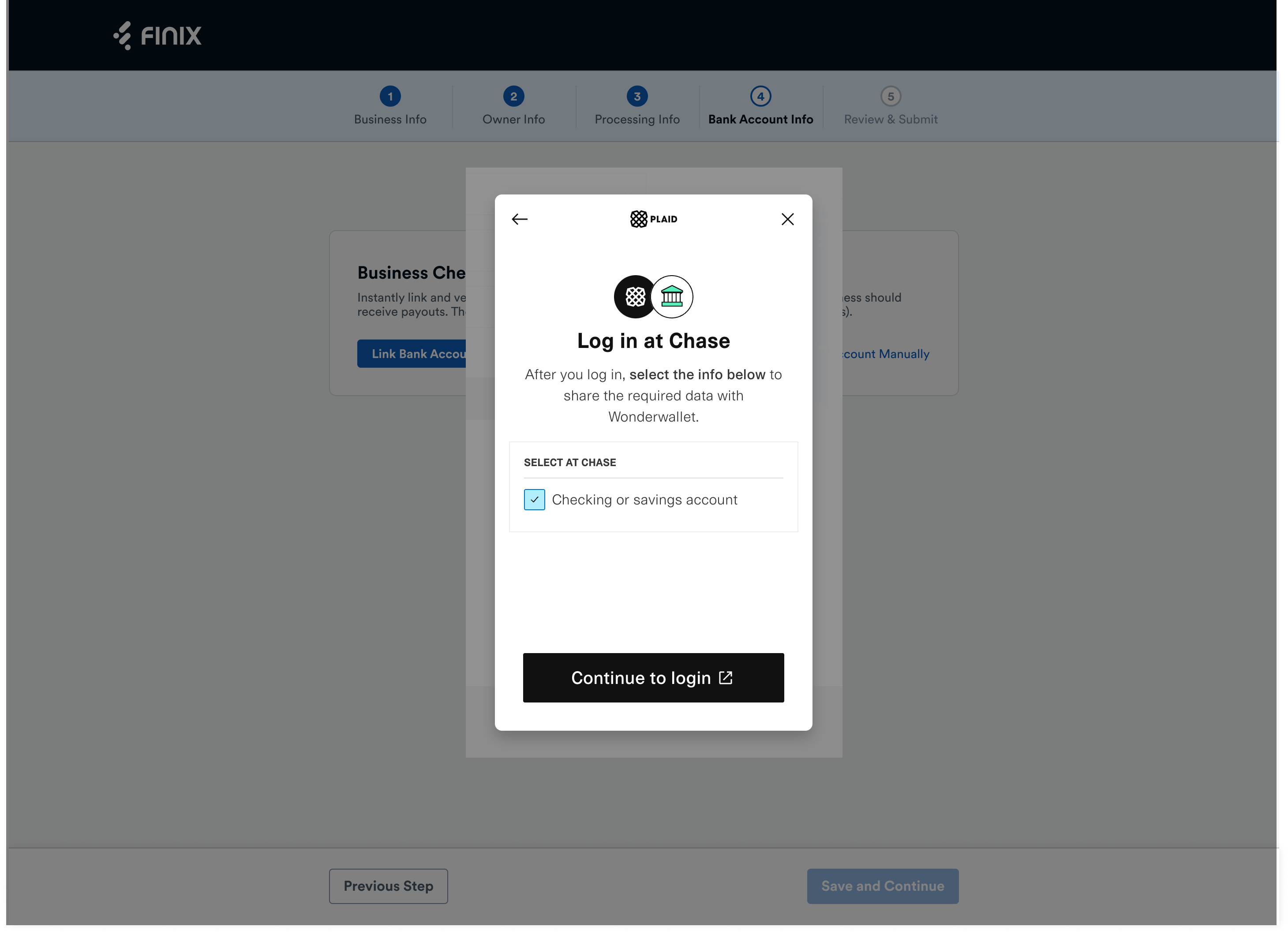
If you prefer a low-code or no-code solution, you can use Finix's Onboarding Forms to let your sellers connect their bank accounts with Plaid during the Finix onboarding process. Finix's Onboarding Forms let sellers on your platform choose whether to connect their bank accounts through Plaid Link or manually, giving them the flexibility to pick the option that works best for them.
When you create payment_instruments with Plaid processor_tokens, Finix uses Plaid Auth to securely get and save the account and routing numbers. Finix also uses Plaid Identity to verify the ownership of the bank account, which is critical for mitigating fraud and protecting our customers.
Bank accounts created with Plaid never require microdeposit verification — they're verified and ready to use as soon as they're created.
Bank accounts connected and verified with Plaid will have bank_account_validation_check: VALID:
{
  "id": "PI3AbkuRR1JbT5kPiGQCXvD9",
  "created_at": "2022-10-11T01:42:53.29Z",
  "updated_at": "2022-10-11T01:42:53.29Z",
  "application": "APgPDQrLD52TYvqazjHJJchM",
  "created_via": "API",
  "currency": "USD",
  "enabled": true,
  "third_party": "PLAID",
  "third_party_token": "processor-sandbox-0asd1-a92nc",
  "fingerprint": "FPRd5moHxL3Ltuvk4cczxetCg",
  "identity": "IDpYDM7J9n57q849o9E9yNrG",
  "instrument_type": "BANK_ACCOUNT",
  "account_type": "PERSONAL_CHECKING",
  "bank_account_validation_check": "VALID",
  "bank_code": "123123123",
  "country": "USA",
  "masked_account_number": "XXXXX3123",
  "name": "John Doe",
  "tags": {},
  "type": "BANK_ACCOUNT",
  "_links": {}
}Connecting bank accounts with Plaid is advantageous by offering:
- Better customer experience: Plaid lets your customers add their bank account details simply by logging into their bank account, rather than providing their bank account and routing numbers manually
- Faster onboarding: Plaid verifies bank account existence and ownership instantly, providing the fastest onboarding experience for your customers
- Increased security - Plaid limits the need for Finix customers to handle bank account data directly, which is preferable from a security standpoint
- No microdeposit verification: Plaid verifies ownership instantly, so buyers skip the microdeposit verification flow entirely
Finix supports U.S. and Canadian Plaid bank account connections. Finix uses Plaid's Auth API to create Payment Instruments with the following details.
- Account Number
- Routing Number
- Account Number
- Transit Number
- Institution Number